
Compare payroll export options for accurate pay and agency billing

A payroll export is only as useful as the timesheet and pay details behind it. Payroll export software for staffing agencies should make variable pay, different worker arrangements and approved hours easier to handle, while keeping the route from timesheet to worker pay and client billing clear.
A file can move figures between systems, but that doesn’t guarantee the figures are complete or ready to use. This guide explains what a staffing workflow can support and where manual checks remain, so you can assess how an export fits your agency’s process.
You’ll learn what to consider in worker records, approved hours and export formats, then follow the process from shift booking through timesheet approval and data export. Use these steps to judge how an agency management platform can fit your existing payroll and client billing workflows.
Key Takeaways
- Identify how overtime, shift premiums and other variable pay should be recorded before choosing an export approach.
- Keep worker arrangements and pay details clearly distinguished so payroll data is easier to review.
- Assess how exported files fit your existing systems, including the fields and formats each one needs.
- Map the route from approved timesheets to worker earnings and client invoices to spot where hand-offs need attention.
Overtime, shift premiums, and variable pay
For temporary recruitment, the rota sets the starting point for pay. A care home may request a night shift, then approve different hours on the timesheet. Keep the worker, client, shift date, recorded hours and pay category connected. Otherwise, payroll staff may need to trace a changed figure through separate records.
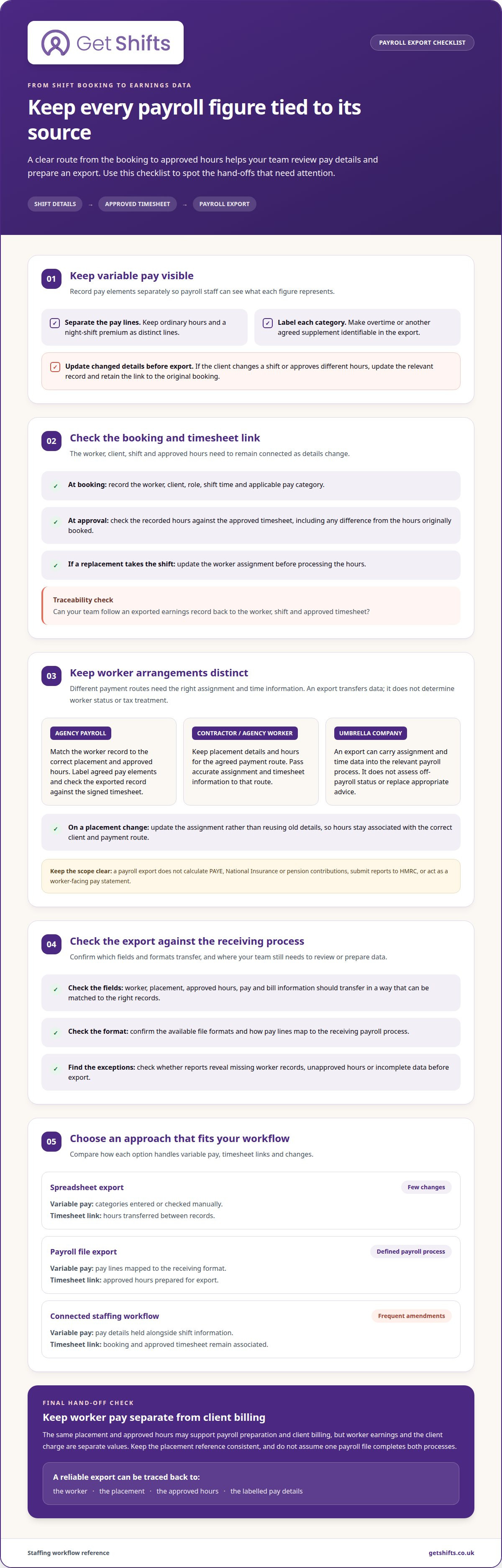
Separate each pay element in the export. For example, record ordinary hours and a night-shift premium as distinct lines, rather than combining them into one total. The same approach helps identify overtime or another agreed supplement. A clear label lets payroll staff see what the figure represents and compare it with the approved timesheet.
Variable pay begins with the placement details. Before dispatch, record the worker, client, role, shift time and applicable pay category. If the client changes the shift or approves different hours, update the relevant record before exporting. That gives your team a traceable route from the original booking to the final earnings data.
| Option | Variable pay detail | Timesheet link | Best fit |
|---|---|---|---|
| Spreadsheet export | Pay categories entered or checked manually | Hours transferred between records | Simple workflows with few changes |
| Payroll file export | Pay lines mapped to the receiving format | Approved hours prepared for export | Agencies with a defined payroll process |
| Connected staffing workflow | Pay details held alongside shift information | Booking and approved timesheet remain associated | Overlapping rotas and frequent amendments |
Shift dispatch adds another hand-off. When a worker accepts an open shift, make sure the booking carries the correct client and pay category. If a replacement takes the shift, update the worker assignment before processing hours. This keeps talent coordination and earnings records aligned.
Choose a workflow that preserves the link between each worker, shift and approved timesheet as details change. The practical test for payroll export software for staffing agencies is whether your team can trace an exported earnings record back to its source.
Payroll for employees, contractors, and agency workers
Keep each worker’s arrangement, placement and approved hours distinct. For umbrella-company workers, an export can carry assignment and time data into the relevant payroll process. It does not determine the worker’s status or tax treatment under off-payroll rules.
Employee payroll
For a worker on an agency’s payroll as an employee, the export needs to match the employee record with the correct placement and approved hours. Keep any agreed pay elements clearly labelled, then check the exported record against the signed timesheet. This differs from contractor or umbrella arrangements, where another party may handle payroll processing and needs the right assignment information.
Contractor and agency worker payroll
Contractors and agency workers may follow different payment routes, so don’t treat every worker record as the same payroll type. Retain placement details and hours for the agreed payment process, and pass accurate assignment and timesheet information to the relevant payroll route. An export transfers data; it does not assess off-payroll status or replace appropriate employment or tax advice.
During onboarding, link the worker’s record to the correct placement before their first shift. Capture the agreed working arrangement and the details needed to identify the client, role and hours. If a candidate moves to a new placement, update the assignment rather than reusing old details. This helps prevent hours from being associated with the wrong client or pay route.
Worker self-service and pay statements are separate from a payroll export. An export provides payroll data, but it is not a worker-facing statement. If a worker queries a missing shift, review the recorded hours and approval status against the timesheet, rather than relying only on a total in an exported file.
Track temporary staff hours against the specific shift and placement. If a client approves fewer hours than booked, retain the approved figure for the payroll hand-off. Linking the worker, assignment and hours makes corrections easier to trace and helps prevent records being mixed across clients.
Payroll integrations with accounting and HR systems
Compare platforms by whether worker, placement, approved-hours, pay and bill fields transfer cleanly, and whether reports expose missing or mismatched data. UK staffing agencies need exports built around temporary placements; an export can carry payroll inputs, but doesn’t itself calculate PAYE, National Insurance or pension contributions, or submit reports to HMRC.
Payroll preparation and export integrations
An export prepares records for transfer into a separate payroll process. Check which fields and file formats are available, and whether each record can be matched to the correct worker and placement. A spreadsheet export may require manual preparation before import. The receiving payroll software handles calculations and reporting according to its own setup.
There isn’t one fixed cost for payroll export software. Pricing depends on factors such as the required workflows, systems and export scope, and is provided after a quote request.
Pay and bill integration
Pay and bill integration keeps the worker’s pay information and the client’s charge information associated with the same placement and approved hours. Compare whether your process can preserve those separate values when records move between platforms. A payroll export alone may cover worker earnings data, while invoicing uses billing information; don’t assume one file automatically completes both processes.
For example, a care shift may have approved hours used in both payroll preparation and client billing. Keeping the placement reference consistent helps staff reconcile the two records without confusing worker earnings with the client charge.
Automation and reporting features
Automation can reduce repeated data entry, while reporting helps teams find exceptions before export. Check which steps happen within the platform, which require review, and whether reports reveal missing worker records, unapproved hours or incomplete data. These checks matter when your team handles changes across several clients.
Payroll exports contain personal information. Risks include sending a file to the wrong recipient, sharing unnecessary fields or retaining an outdated copy. Limit access to appropriate staff, use a controlled transfer method and follow clear handling procedures. The ICO provides UK data protection guidance; consult its current guidance for your organisation’s circumstances.
Timesheet-to-payroll and billing workflows
Payroll exports can carry approved timesheets and earnings data into a separate payroll process. The receiving system may support fields for overtime, holiday pay, expenses or deductions, but the export itself does not calculate or approve those amounts.
Timesheet handling
A timesheet records hours against a worker, shift and client. In a clear workflow, the client approves the hours before the approved record moves into payroll preparation and billing. If a shift changes, make the amended hours distinguishable from the original entry so both processes use the same approved version.
For example, a care home approves fewer hours than the rota originally showed. The approved timesheet should provide the hours used for payroll preparation and the client invoice, rather than leaving teams to reconcile separate totals by email.
Overtime and holiday pay
Keep overtime identifiable and separate from ordinary hours when preparing payroll data. An export can pass the category and hours to the payroll process, where the applicable treatment is handled. In the UK, an overtime premium is contractual, while average pay across all hours must meet the National Minimum Wage or National Living Wage.
Holiday pay needs its own clear treatment in the payroll workflow. Keep relevant hours or pay data separate from shift earnings, and don’t assume the export determines the correct calculation. The receiving payroll process needs to apply the worker’s relevant arrangement.
Keep expenses and deductions distinct from worked hours. For example, record an approved expense separately and identify deductions as their own entries rather than reducing the hours total. This makes payroll data easier to review and keeps billable shift hours clear.
A useful hand-off follows a simple order: match the worker and placement, confirm client-approved hours, classify each pay element, then export. Review rejected or amended records before invoicing. This connects payroll preparation and client billing without treating the payroll file as an invoice.
To connect approved hours with the next billing step, explore digital timesheet workflows.
Get Shifts: Staffing Agency Management Software
Get Shifts provides staffing agency management software for agencies that need shift bookings, worker earnings and export data in one operational workflow. Use shift booking and rota management to organise assignments, then prepare worker earnings and payroll exports from the records held in the system.
Exports are not payroll processing. They provide data for your team’s payroll process. Get Shifts can export worker, shift, timesheet, invoice and earnings data in CSV or Excel format, helping agencies bring staffing records together before reviewing and transferring payroll information.
If your current process involves re-entering shift details across separate files, contact Get Shifts to discuss how the software fits your agency’s workflow.
Make your next payroll hand-off clearer
Map how information moves from booking a shift to preparing payroll and billing records. This helps you identify which details need to stay consistent and where staff still rely on manual re-entry.
For agencies reviewing payroll export software, the workflow should fit how you organise placements and process approved hours. Get Shifts’ staffing agency management platform brings shift booking and rota management together with open shift broadcasting to eligible workers, supporting the operational records behind payroll exports.
Use that workflow as a practical starting point: identify the hand-off causing the most repeated work, then consider how a clearer record flow could help. Contact Get Shifts about payroll exports and take the next step towards a more organised process.
Frequently Asked Questions
Which staffing agency payroll systems integrate with major accounting and payroll platforms?
Get Shifts does not provide live integrations with accounting or payroll platforms. Data can be exported in CSV or Excel format for manual import into a separate system. Before adopting a workflow, compare the required column names and worker identifiers, then test how it handles a corrected record. A small trial with representative data can reveal mismatches before the process becomes routine.
What payroll data can staffing agencies export, and in which formats?
Available exports include worker, shift, timesheet, invoice and earnings data in CSV or Excel format. Choose the records that match the task, then agree a consistent file name and reporting period with the staff who handle payroll and billing. For instance, separating payroll preparation files from invoice review files can reduce the risk of using the wrong dataset during a busy processing period.
Which payroll export software is best for small versus large staffing agencies?
Payroll export software for staffing agencies should suit the hand-offs your team manages, not just the size of the agency. Consider who prepares files, who reviews exceptions and how often placements or hours change. Trace a typical pay period from approved records to the receiving process, noting where staff must resolve mismatches or repeat data entry.