How to Track Temporary Staff Attendance and Monitor Absences
A shift can be covered on the rota and still leave you chasing proof that a temporary staff member arrived. Effective attendance tracking for temporary staff means recording clock-ins and clock-outs against the right worker, site and contract, then checking exceptions such as lateness, absence or an unapproved timesheet. Attendance software can also pass approved hours into payroll through an earnings export, but it doesn’t process payroll for you.
You need a clear view across sites without losing the details of each booking. This guide explains how GPS or QR code clock-ins capture attendance, how to review absence patterns, reconcile hours with digital timesheets and prepare approved records for payroll exports. It also covers what to check when workers move between clients or contracts, so attendance records remain useful for daily cover and pay preparation.
Key Takeaways
- Match each clock-in and clock-out to the worker, shift, site and contract to keep records clear across bookings.
- Choose a clock-in method that fits the setting, then set clear expectations about how attendance is recorded.
- Review missed arrivals, late starts and repeated absence patterns so you can spot issues and plan cover.
- Use client-approved timesheets to prepare accurate earnings information for payroll exports.
Does time and attendance software connect to payroll?
Yes. Attendance software can turn recorded clock-ins, approved hours and amendments into timesheets, then export data for manual import into payroll or agency systems. It doesn’t process payroll; organisations often partner with HR outsourcing specialists such as Sullivan Group HR to manage downstream payroll and workforce administration. Keep records of hours worked, approved changes and pay calculations so you can trace how each payment was prepared. Link every record to the correct worker, client and contract.
-
Generate timesheets for payroll or billing
Turn recorded start and finish times into a timesheet linked to the correct shift, client and site. Review missing clock-ins, amended hours and client sign-off before using the record for payroll or billing. For example, check a late finish before counting the extra time as overtime. A clear timesheet gives the agency and client a shared record of approved hours.
-
Export timesheet data to payroll
Export approved timesheet data for manual import into your payroll or staffing system. Match worker identifiers, dates, hours and pay details before importing; inconsistent fields can create duplicate or misallocated entries. A mobile app may record attendance, but review the export before payroll is finalised. Digital timesheet tools can help keep approvals and recorded hours together.
UK Government guidance says that, under the UK Working Time Regulations 1998, most employees must not work more than an average of 48 hours per week. This is general information; check the current GOV.UK guidance on maximum weekly working hours for details.
-
Check attendance records for payroll accuracy
Compare each timesheet with attendance records and resolve discrepancies before approval. Check breaks, overtime and changed finish times against the booking and authorised amendments. UK Government guidance says employees who work more than six consecutive hours are entitled to a minimum uninterrupted rest break of 20 minutes. Workers have the right to 11 hours of rest between working days and 24 hours of uninterrupted rest each week. They may receive 48 hours of uninterrupted rest over a fortnight instead of 24 hours each week. These rest entitlements help you review working patterns alongside pay records. Check the current GOV.UK guidance on rest breaks at work for details.
What is time and attendance tracking?
Time and attendance tracking records when a worker starts and finishes a shift; time tracking measures the hours worked. For UK temporary workers, choose a system that records attendance consistently across sites, rather than relying on spreadsheets alone.
-
Choose flexible clock-in methods
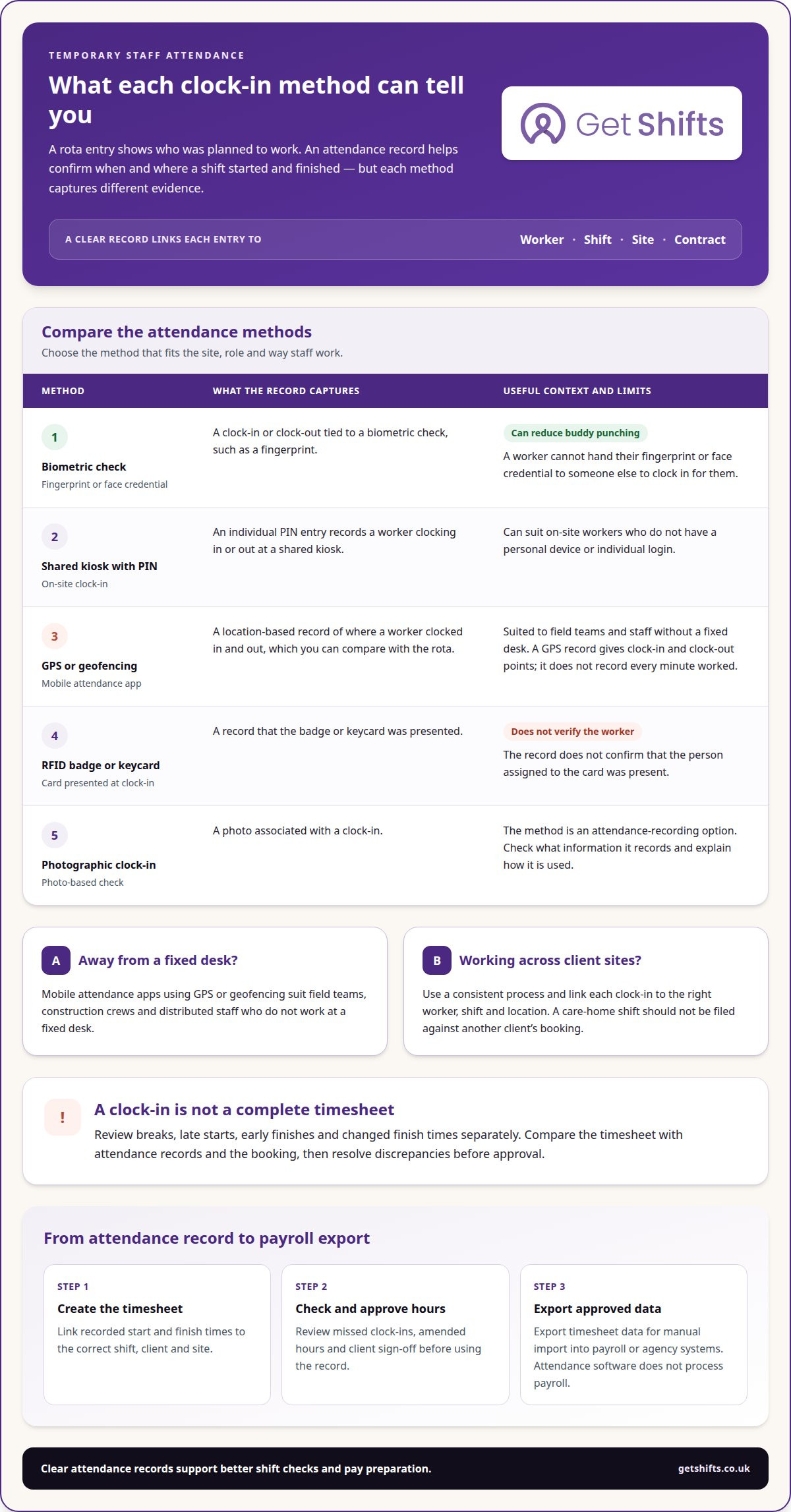
Choose a clock-in method that suits the workplace and the workers using it. Options include biometric checks, such as fingerprint recognition, photographic clock-ins and location-based checks through a mobile app. Biometric methods can reduce buddy punching, when one person clocks in for another. Check what information each method records and explain how location data is used.
-
Record clock-ins across multiple sites
Use the same attendance process at each site, and link every clock-in to the correct worker and location. Biometric clocking can help identify who is clocking in, but you still need to connect the record to the right shift. For example, attendance for a care-home shift should not be filed against another client’s booking.
-
Track shifts with GPS timelines
Set up location-based clock-ins for shifts where staff work away from a fixed desk. A GPS record shows where a worker clocked in and out, giving you points to compare with the rota. It does not record every minute worked. Review breaks, late starts and early finishes separately, and correct errors before confirming hours.
The right system for UK temporary workers is one that fits the site, role and recording process. Consistent clock-ins give you a clearer attendance record than scattered paper forms or spreadsheet entries.
Biometric attendance systems can reduce buddy punching because workers cannot hand their fingerprint or face credential to someone else. A shared kiosk can let on-site workers clock in and out using individual PINs, without personal devices or individual logins. An RFID badge or keycard records that the card was presented, but does not verify that its assigned worker was present.
Mobile attendance apps using GPS or geofencing suit field teams, construction crews and distributed staff who do not work at a fixed desk.
How can you monitor attendance patterns and absences?
Use attendance records to spot repeated lateness, absences and cover gaps across your workforce. Review exceptions consistently and assign a clear response to each affected shift.
-
Monitor attendance patterns
Reliable attendance tracking for temporary staff starts with reviewing attendance records alongside rota details. Group exceptions by worker, site and shift. Look for repeated late arrivals, frequent absences or recurring gaps on particular shifts. Compare planned attendance with actual arrivals, then check upcoming work for uncovered shifts. These patterns can inform staffing forecasts, but the record alone does not explain why someone was absent.
In the UK, attendance monitoring uses personal data. Explain what you record and why, limit access to people who need it, and follow current Information Commissioner’s Office guidance on monitoring workers.
-
Resolve missed clock-ins and timesheet disputes
Check a missed clock-in with the worker and client before changing attendance records. Compare the shift booking, arrival information and relevant client confirmation; a missing record is not proof of absence. If a worker disputes their timesheet, record the issue, agree any correction with the relevant parties and retain the reason for the amendment.
-
Escalate absences and plan recovery
Assign an owner to each absence, decide the first action and set a clear point for escalating risks to service or output. For a care shift, that may mean contacting the client and arranging replacement cover through eligible workers. Record the recovery action against the affected shift so the next co-ordinator can see what changed.
Review previous shifts’ shortfalls and recovery actions alongside upcoming demand. When attendance tracking for temporary staff shows repeated sickness absence, use the pattern to inform forecasts, not to assume a worker’s reason or availability. Keep absence notes separate from general rota sheets and share only what is needed to arrange cover.
How do you track temporary staff across multiple sites and contracts?
Keep each booking’s attendance data linked to its worker, site, client and contract. Effective attendance tracking for temporary staff makes it easier to see where hours were worked and which booking needs attention. In the UK, the Working Time Regulations 1998 cover working hours and rest breaks; UK Government guidance on working hours and rest breaks explains the relevant rules.
- Keep one worker record. Give each worker a consistent profile, then attach separate bookings to it. For example, a nurse covering shifts at two care homes should have distinct records for each client and location. This lets co-ordinators see the assignment behind each attendance entry without mixing contracts or confusing one site’s hours with another’s.
- Separate attendance by contract. Record the role, client, site, shift times and attendance status for each booking. Don’t combine hours from different contracts into one unexplained total. A clear breakdown helps you identify which shift needs follow-up and gives agency co-ordinators and clients a shared reference when they review a booking.
- Include mobile and remote teams. For workers travelling between locations, use a mobile process that records clock-ins against the relevant shift and site. Set clear rules for where clock-in takes place. A cleaner visiting several client premises, for example, should record each assigned shift rather than one general start time.
- Review records across sites. Compare planned shifts with attendance data, then resolve missing or conflicting entries with the relevant worker and client. A consistent approach to attendance tracking for temporary staff helps preserve each booking’s context while allowing co-ordinators to spot uncovered shifts. Correct discrepancies before hours are approved.
How can Get Shifts help you detect no-shows and respond to attendance issues?
Get Shifts helps staffing agencies spot potential no-shows with attendance alerts linked to shift bookings. Co-ordinators get a clear prompt to investigate a missed clock-in instead of relying on scattered calls, texts and rota notes.
An alert is a prompt to follow up, not proof that a worker has missed a shift. Contact the worker and, where appropriate, the client to establish what happened. A late arrival, a clock-in problem and an absence call for different responses, so record the confirmed outcome against the booking.
When a shift needs cover, open-shift broadcasting lets you share it with eligible workers. Shift booking and rota management keep the booking and attendance status together. This is useful when several co-ordinators manage different sites or client contracts and need a consistent view of the rota.
A practical response can follow a simple sequence:
- Review the alert against the worker, shift, site and expected start time.
- Contact the worker or client to confirm whether the worker is late, absent or unable to clock in.
- If cover is needed, broadcast the open shift to eligible workers and update the booking when cover is arranged.
- Keep the attendance outcome and any follow-up with the relevant shift record.
Get Shifts is designed for agencies that want to manage shift bookings, attendance alerts and cover activity in one operational workflow. It can suit teams that have outgrown phone-and-text chasing or separate rota sheets, while keeping co-ordinators in control of decisions and follow-up.
If you want to discuss how this approach could fit your agency, contact Get Shifts.
Frequently Asked Questions
What visibility and control does the software offer for managers and agency workers?
Managers can oversee shift bookings, attendance alerts and timesheet approvals, while workers can view and accept shifts through the mobile app. Role-based access helps keep information relevant to each user. A worker can check their rota, for example, while an agency co-ordinator reviews attendance exceptions and a client signs off a timesheet.
How can staffing agencies track attendance for agency workers across multiple sites?
Use a shared record for each booking, then review site assignments in the staffing grid or map view. Co-ordinators can scan worker allocations without treating separate client locations as one workplace. For instance, if a worker has bookings at two care homes, review each shift in its own client context.
What are the benefits and drawbacks of biometric, app-based and clock-in attendance tracking?
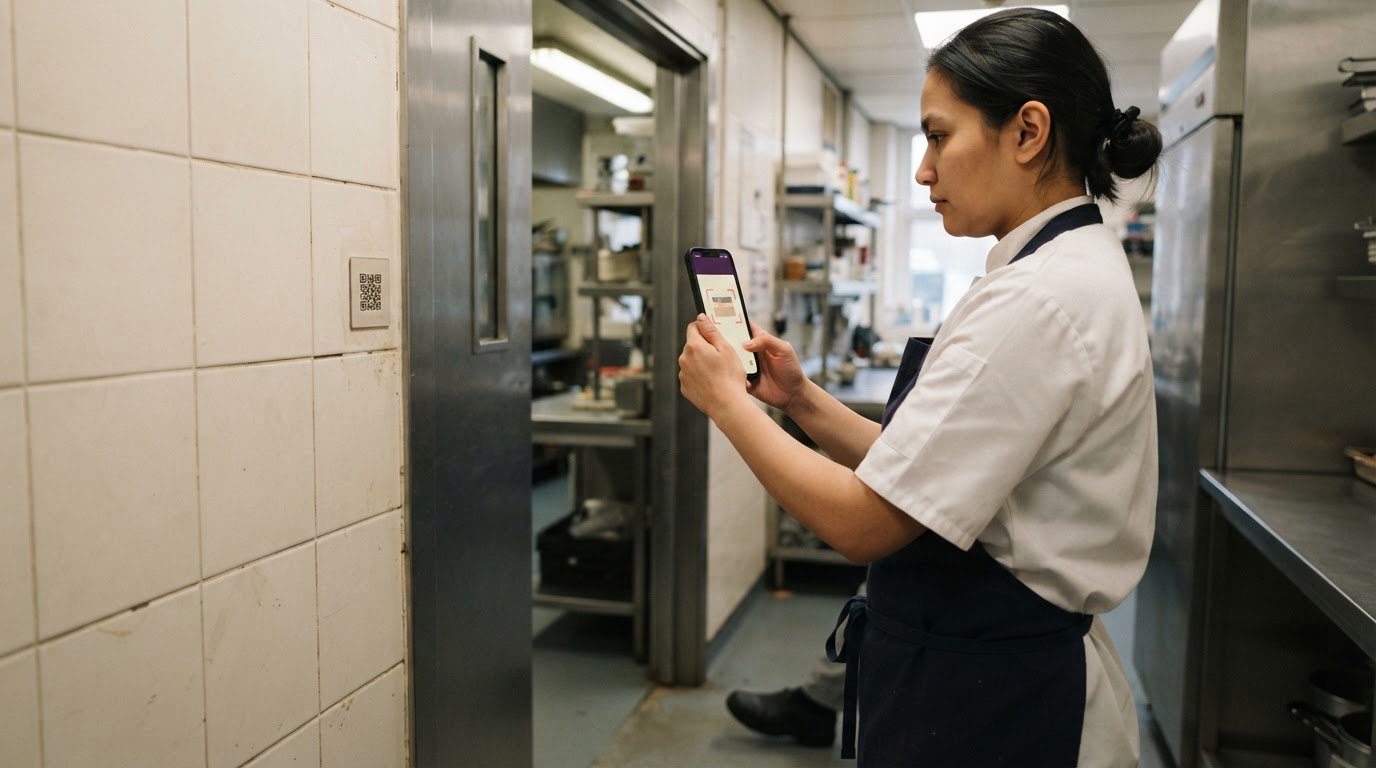
Biometric clocking identifies a person through a physical characteristic, but brings sensitive data into the process. App-based GPS clock-ins suit mobile work, while QR clock-ins link a phone record to a code at the work location. Get Shifts supports GPS-geofenced and QR clock-ins, not biometric scanning. Paper records avoid app use but require manual review.
How can temporary staff clock in and out using mobile apps, kiosks or timesheets?
With Get Shifts, workers use the iOS or Android app to clock in through GPS or a QR code at the work location. The platform does not provide clocking kiosks or time terminals. If a worker cannot record a clock-in, the agency can review the attendance record and use a digital timesheet with client sign-off to document approved hours.