Staffing agency timesheet software for reports and exports

A timesheet should settle the hours worked, not trigger another round of chasing. Digital timesheet software helps staffing agencies record shift hours, collect client sign-off and turn approved time into reports and exports. That gives you a clearer route from a completed shift to the figures your team needs.
If paper forms, messages and spreadsheets leave gaps between hours submitted, approved and billed, timesheet administration becomes difficult to manage. This article explains what timesheet software does, how agencies and clients use it, and how reports and exports support day-to-day work. If you’re assessing digital timesheet software for staffing agencies, you’ll also find practical points to consider, including how a system fits your rota and approval process.
Key Takeaways
- Use digital time records to make shift hours easier to submit, review and approve.
- Keep worker and client sign-off in one process so timesheet queries are easier to trace.
- Use reports to review recorded hours, then compare approved timesheets with exported and billed totals.
- Choose a system that fits your agency’s rota and approval workflow, and produces data in a format your team can use.
Automated time tracking and productivity
For a staffing agency, digital time tracking turns shift hours into records that are easier to review and use. For example, a care home shift can move from the worker’s recorded start and finish times to client approval and a billing check.
Automated time capture
Automated time capture records when a worker starts and ends a shift, then calculates the hours for review. The agency can compare the entry with the booked shift and investigate a mismatch before approval. A shift recorded as lasting more than 10 hours in a day can be flagged for review. Check how the system handles missing clock-ins, corrections and breaks; clear exception handling matters as much as capturing time.
Automatic timesheet copies
A digital timesheet gives the worker, client and agency a shared record without another paper form or manual email. It should show the shift, recorded hours and approval status, so everyone can refer to the same entry. Decide who receives the record and when, particularly if a client queries a shift before approval. A clear status makes the next action easier to identify.
Billing automation starts with approved hours. The system can use those hours in the agency’s billing workflow, reducing repeated entry between timesheets and invoices. Keep a separate step for disputed or amended records, so approval does not conceal a discrepancy. If a client approves fewer hours than the worker submitted, for example, resolve the difference before billing.
Automation also changes how coordinators spend their time. An example estimate suggests saving 90 seconds per timesheet entry can save 750 minutes per month. The practical gain comes from removing repeated copying and checking, not from skipping review. Track how many entries need correction, how long approvals take, and where billing discrepancies arise. Those measures show which part of the process needs attention.
What is timesheet software?
Timesheet software lets workers record hours digitally and gives clients a way to review and approve them. Staffing agencies can replace paper forms with a shared process that shows whether each entry is awaiting review, approved or queried.
Approval status and time-off requests
Clear statuses help the agency identify which timesheets need action. A worker records hours, the client reviews them, and the agency follows up on any query before the record is finalised. Time-off requests are a separate workflow. If the system supports them, workers submit a request and managers record the decision. Keep absence requests separate from timesheets, so a planned day off is not mistaken for missing hours.
A client might approve a night shift but query its finish time. The agency should see that the entry needs attention, rather than treating it as ready for payroll. Check that each approval status has a clear next step, an owner and a record of any change.
Sending approved hours to payroll
Once hours are approved, they can be exported for the agency’s payroll process. A payroll export is a data file, not payroll processing. Before sending it, check worker details, dates, approved hours and relevant pay information against the payroll team’s required format. Keep queried entries out of the export until resolved, then export the corrected, approved record.
If a care home approves a revised shift length, for example, use the approved hours rather than the original submission. A consistent export process gives payroll a clear source record and helps the agency trace discrepancies.
Moving from paper to digital timesheets
Start by mapping the current process: who submits hours, who approves them, and what happens when a client queries an entry. Set up the same approval stages digitally and agree how workers and clients will submit or review records. Begin with one rota or client group, then test real shifts for missing hours, corrections and approvals.
Keep paper records available during the changeover, then compare them with digital submissions until the new process is working reliably. If you’re reviewing how this process could work for your agency, explore digital timesheet workflows.
Timesheet reports and exports
Timesheet reports turn approved shift records into information your agency can review. A weekly report might group hours by worker, client, site or date. Use these views to spot missing approvals, compare hours across care homes and identify shifts that need a closer look. Reports can also help clients understand hours worked and review service delivery.
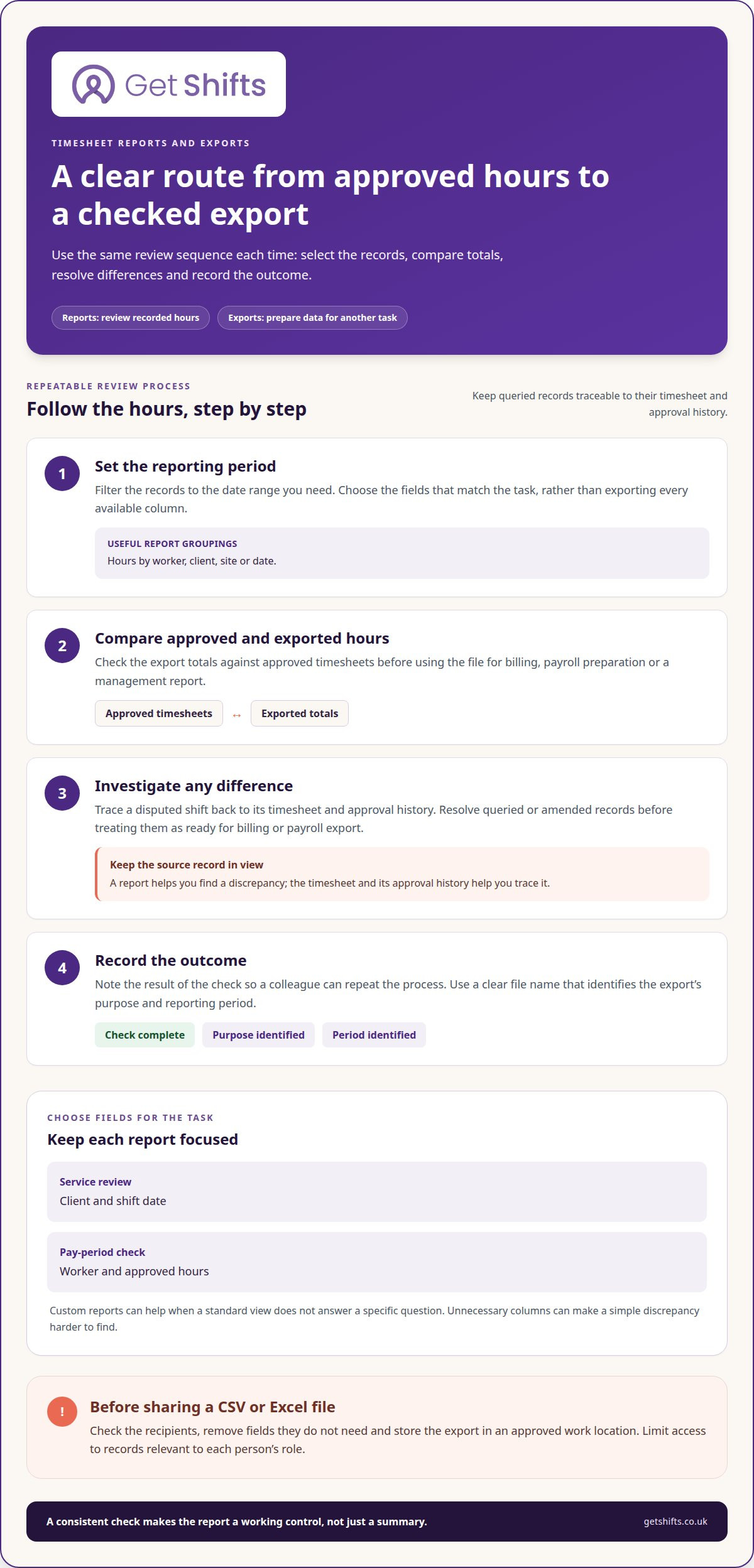
Exports move selected records out of the reporting system for another task. A CSV or Excel file can support a billing review, payroll preparation or management report. Before exporting, set the date range and choose the required fields, then check totals against approved timesheets. For example, compare approved hours with exported hours before using the file for billing.
Custom reports are useful when a standard view does not answer a specific question. Choose fields that match the decision: client and shift date for a service review, or worker and approved hours for a pay-period check. Keep the report focused, as unnecessary columns can make a simple discrepancy harder to find. Give each file a clear name that identifies its purpose and reporting period.
Protect timesheet data by controlling who can view and export it. Assign access by role, such as coordinator, manager or client contact, and limit each view to relevant records. Before sharing a CSV or Excel file, check the recipients and remove fields they do not need. Store the export in an approved work location, not a personal inbox or shared device.
Use a repeatable review process: filter the reporting period, compare approved and exported totals, investigate differences, then record the outcome. If a client disputes a shift, trace the report back to its timesheet and approval history. This makes the report a working control, not just a summary. Consistent fields and clear export names also help colleagues repeat the check next week.
Timesheet software for recruitment and staffing agencies
There’s no single platform that suits every UK staffing agency. Choose one that fits your placements, client approvals and how your team uses recorded hours.
Temporary and contract roles often need shift-level records, while permanent staffing may require a different process. Prioritise clear sign-off, amendment records and usable exports.
Choosing a platform for staffing agencies
Start with the tasks your coordinators handle each week. Map how workers submit hours, how clients approve them and how your team resolves queries. Then assess whether a platform keeps those steps connected to each placement. A system designed around agency workflows may suit you better than a general time tracker, especially when different clients use different approval processes.
Test a typical shift from submission through approval to reporting. Include a correction, such as a client querying a finish time. Check that the record displays its current status and provides a clear route to the amended entry. A practical walkthrough can reveal gaps that a feature list misses.
Comparing solutions across staffing types
Temporary staffing commonly centres on shifts, rotas and client sign-off. Contract assignments can also use shift-based timesheets, depending on how the placement is agreed and billed. Permanent roles may involve regular hours or another recording process, so avoid forcing every role into the same workflow.
Compare systems by the records each placement requires. For a temporary care shift, a client may need to approve the hours worked. A longer contract may need consistent records across repeated working periods, while a permanent role may not require client approval for every shift. The right fit reflects your agency’s actual working arrangements.
Features for recruitment and staffing agencies
Useful capabilities include digital timesheet submission, client sign-off, visible approval status and an amendment history. CSV or Excel exports can help teams use approved hours for payroll preparation or billing workflows. Check that exports contain the relevant fields and distinguish approved records from entries still under query.
Also consider how timesheets relate to placements, clients and shifts. Clear connections make it easier to trace a query back to its source. To explore an agency-focused workflow, review digital timesheet software alongside your approval and export needs.
Get Shifts: Staffing Agency Management Software
Get Shifts brings shift booking, rota management and timesheet approvals together in one staffing agency platform. Digital timesheets with client sign-off give workers and clients a clear approval step. When a timesheet needs changing, its amendment history records the reason, helping your team trace what changed.
It’s a practical option if coordinators are copying hours between paper forms, messages and spreadsheets, or struggling to trace a client query back to a shift. Your agency can manage bookings and rotas alongside timesheets, keeping the workflow connected while using payroll exports as data files, not payroll processing.
If you want to discuss how Get Shifts could fit your agency’s timesheet process, contact Get Shifts.
Make your next timesheet process easier to manage
Map where timesheet work slows down: from filling a shift and finding cover to recording hours and resolving queries. This gives you a practical way to judge whether digital timesheet software for staffing agencies fits your daily workflow. Look for a process that supports the work before and after approval, not just the timesheet itself.
Review how your team handles bookings, rotas and shift cover alongside timesheets. This can help you identify where handovers or queries slow the process down.
If you’re ready to explore a more organised way to manage agency operations, contact Get Shifts to discuss the next step.
Frequently Asked Questions
How does a worker time tracking tool help in staffing and recruitment agency growth?
A worker time-tracking tool can help you see which placements create the most timesheet administration. Compare activity by client, site or role to identify where processes differ and co-ordinators need clearer information. Repeated queries at one care home, for example, may point to unclear shift records or approval responsibilities. Use these patterns when planning agency workflows as placements grow.
How much does a timesheet app cost for a recruitment agency?
Timesheet software pricing varies by provider and charging model. Costs may depend on user numbers, included functions and billing arrangements. Compare what each plan covers, including reporting and exports, rather than judging the subscription figure alone. Also consider any separate systems your agency uses for payroll or accounts.
How much does digital timesheet software cost for UK staffing agencies?
Digital timesheet software costs vary between providers and plans. Check the plan details against your agency’s requirements before deciding. Software subscription costs are separate from charges for any payroll or accounting systems your agency uses.
How do digital timesheets integrate with agency payroll, invoicing and accounting systems?
Digital timesheet data can support payroll preparation and invoicing, but an export is not a direct system connection. Check with your software provider whether it offers exports or a connection to your payroll or accounting system. Assign someone to check field mapping and import results, so records reach the intended pay period and account categories.
How does digital timesheet software handle worker and client approvals?
Agree who can approve hours for each client account, including who covers when the usual approver is unavailable. This prevents completed timesheets from waiting without a clear owner. A care home, for example, could nominate a main contact and a suitable deputy. Set a route for queried entries too, so workers and clients know who will resolve a discrepancy before the agency closes the period.
What UK laws and regulations apply to electronic timesheets and agency worker records?
Relevant rules depend on the worker’s arrangement and the personal data held in agency records. GOV.UK explains agency workers’ rights, while the ICO provides UK GDPR guidance for organisations. These sources offer general information, not advice for a particular case. Check current official guidance for your situation and seek qualified advice for specific legal questions.