
How to Avoid Expired Compliance Documents on Shifts

A document that was valid at onboarding may expire before a worker’s next shift. To avoid expired compliance documents on shifts, record each document’s expiry date, review upcoming expiries, and resolve missing or out-of-date records before confirming a booking.
A consistent process matters when you’re building rotas across multiple clients and sites. Spreadsheet entries and inbox reminders are easy to miss as bookings change and administrators juggle competing tasks.
This guide explains how to keep expiry dates in one place, identify compliance gaps before shifts, and set renewal reminders with time to act. It also covers reviewing Right to Work evidence and permission status before a booking, so you can see which records need attention before assigning a worker.
Key Takeaways
- Record each document’s type, issue date and expiry date in a consistent worker record.
- Review compliance gaps before confirming a shift, including missing records and permissions that need follow-up.
- Use expiry alerts to give workers and coordinators time to plan renewals before documents lapse.
- Get Shifts can help agencies track worker document expiry and apply booking rules that warn or block when compliance needs attention.
How should you check right to work documents and immigration permissions?
In the UK, check each worker’s Right to Work evidence and permission status before assigning them to a shift. Record the evidence reviewed, any time limit and the next action date.
Right to Work records
Keep a clear record of the check, the evidence reviewed and any permission end date. Limit access to authorised staff, and retain an audit history of who viewed or changed a record; organisations looking to protect sensitive worker records often rely on proactive managed IT specialists like Trinity Networx, LLC to ensure their core infrastructure remains secure. There is no single renewal interval for every workplace document: timing depends on its validity and the role or client’s requirements. Qualification certificates also vary by role, so use current regulator or contractual guidance to identify what applies.
Expired physical permits
Since 26 June 2025, an expired physical Biometric Residence Permit is not acceptable proof of a person’s right to work in the UK. Don’t treat the card’s expiry as proof that permission has ended, or as proof that permission continues. Record the check completed and the evidence relied on, then take action where the worker’s digital status or permission needs clarification.
Time-limited permissions and follow-up checks
For time-limited permission, record the relevant end date and plan a follow-up check before it expires. Under section 3C of the Immigration Act 1971, existing immigration permission and its work conditions may extend when a valid in-time application is made before permission expires, according to the UK legislation register. In certain follow-up situations involving a qualifying outstanding application, appeal or administrative review, the UK Home Office says an existing statutory excuse may have a limited extension of up to 28 calendar days.
Expired or invalid evidence can expose an employer to a civil penalty and leave a shift uncovered. Keep the check outcome, relevant dates and follow-up action together, so the status is clear when a booking is reviewed.
How can you record and manage document expiry dates?
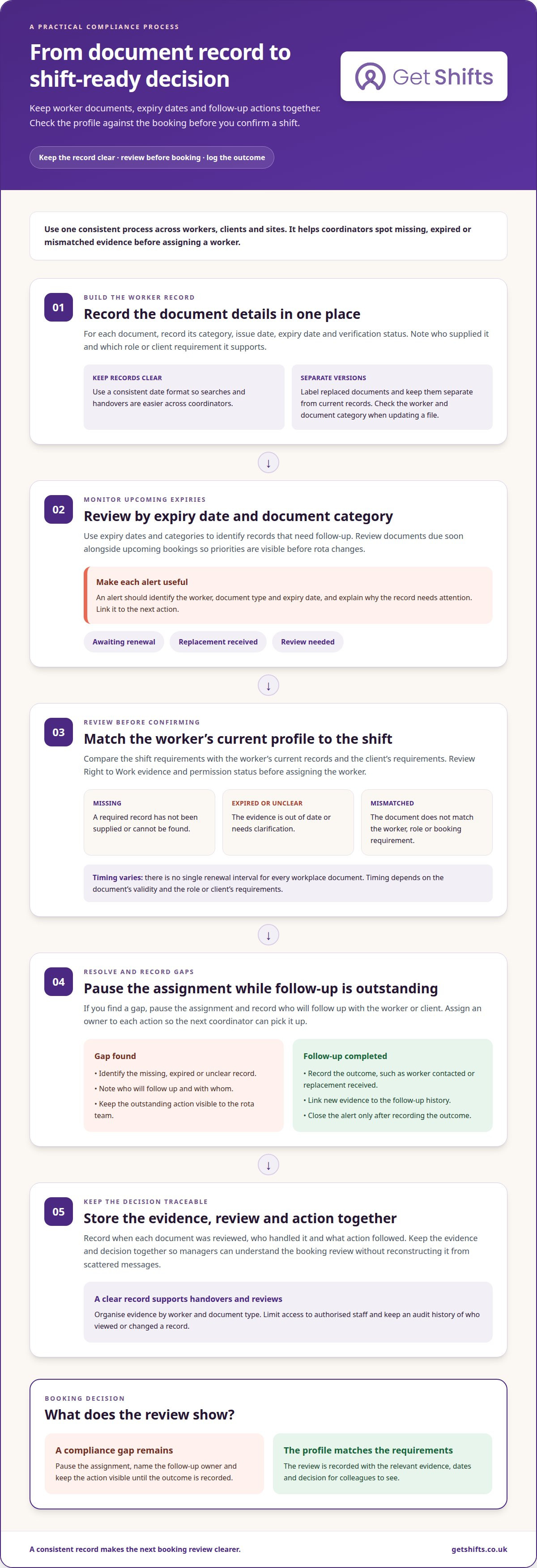
Maintain one consistent record for each worker’s documents, including issue dates, expiry dates and verification status. Regular reviews help identify missing details and avoid expired compliance documents on shifts.
Recording issue and expiry dates
For each record, identify the document category and the role or client requirement it supports. Use a consistent date format and note who supplied the record. This makes searches and handovers clearer when several coordinators manage the same worker file.
Label replaced versions clearly and keep them separate from current records. Before updating a file, compare the uploaded document with its recorded category and worker, then note the update date. This helps prevent mix-ups between similarly named certificates and shows which document supported a later decision.
Monitoring document expiry dates
Monitor records by expiry date and category, rather than relying only on searches by worker name. A filter for certificates due soon, for example, can show coordinators which records need follow-up. Review that list alongside upcoming bookings to make priorities visible before rota changes.
Assign an owner to each follow-up and note the outcome, such as “worker contacted” or “replacement received”. A shared process makes handovers clear if the original coordinator is away. Keep document tracking distinct from identity verification and any role-specific assessment, which require separate decisions.
For agencies managing records across clients, worker document expiry tracking can bring expiry dates and compliance status into one process.
How can you spot compliance gaps before shifts or inspections?
Review each worker’s compliance profile before confirming a shift, and compare the evidence with the client’s requirements. Missing, expired or mismatched records are gaps to resolve before assigning the worker.
Audit trails and inspection readiness
Keep the evidence and decision together for each record. Note when it was reviewed, who handled it and what action followed. This gives managers a clear account when preparing workforce information for a client review or inspection, instead of requiring them to reconstruct decisions from scattered emails.
For care services, organise evidence by worker and document type so relevant records can be retrieved efficiently. CQC’s current provider assessment guidance explains its approach to assessing services; check it when preparing inspection evidence. A missing qualification document, for example, should be easy to identify alongside the follow-up taken.
Preventing expired documents on shifts
Before confirming a booking, compare the shift requirements with the worker’s current profile. Look for a missing upload, an unclear document or evidence that does not match the role. If you find a gap, pause the assignment and record who will follow up with the worker or client.
Use notifications to flag unresolved gaps to the coordinator managing the rota. For example, if a required certificate is missing for a care shift, the booking team can address that issue before assigning the worker. Keep the decision visible to colleagues, so a rota change does not obscure the outstanding action or leave the client without an update.
How can expiry alerts help you prepare for renewals?
Expiry alerts help managers identify documents that need attention before renewal becomes urgent. Link each alert to the worker, document type and next action, so coordinators can prioritise follow-up around upcoming bookings.
Compliance document expiry alerts
An effective alert identifies the record that needs attention and explains why. A training certificate alert, for example, should identify the worker and expiry date, rather than simply say that a profile needs review. This helps the coordinator contact the right person and understand the issue without searching unrelated records.
Sort alerts by status, such as awaiting renewal, replacement received or review needed. Close an alert only after recording the outcome. If the worker sends a new certificate, link the update to the alert to keep the follow-up history clear.
Automated alerts and renewal reminders
Automated reminders can make recurring follow-up more consistent, while a named coordinator decides what action to take. For example, a qualification reminder can prompt a manager to contact the worker, record the response and schedule another review if replacement evidence has not arrived.
Set an escalation route for unresolved alerts. If a renewal is delayed, a coordinator might flag the record to a manager and review whether upcoming bookings depend on that document. This makes the alert a trackable task, rather than another notification that can be dismissed without action.
Agencies looking to organise this process can use worker document expiry tracking to keep renewal records and their status together.
How can Get Shifts help you track worker compliance and document expiry?
Get Shifts helps staffing agencies manage worker compliance records and document expiry within its staffing agency management software. Coordinators can link evidence to each worker’s record instead of relying on separate spreadsheets and inboxes. The platform supports agencies in care, security, hospitality, cleaning, logistics and office staffing.
Worker Compliance & Document Expiry Tracking helps agencies manage compliance documents and their expiry dates. Your team can use these records when reviewing a worker’s suitability for a booking, while the agency remains responsible for checking the evidence. The software tracks documents; it does not carry out Right to Work, DBS or background checks.
When a care home or hospital needs access to relevant staff documents, Staff Profile Documents for Clients lets the agency share worker profile documents with the client as part of its booking process. The Worker Mobile App is available for iOS and Android alongside the wider agency system.
These tools suit agencies that want to manage worker records, document expiry and staffing administration in one system. They can also help coordinators review compliance information while handling changing bookings. Get Shifts provides software for staffing agencies, not temporary workers or individual shifts.
If you’d like to discuss how the software could fit your agency’s compliance process, contact Get Shifts.
Make compliance part of your booking process
A clear compliance process works best when it fits the way your agency handles bookings. Get Shifts’ Staffing Agency Management Software brings together Shift Booking & Rota Management and Open Shift Broadcasting to Eligible Workers, alongside wider agency operations.
Start by considering where document checks sit in your current booking workflow and where follow-up can become difficult to track. A consistent process can help you avoid expired compliance documents on shifts and show coordinators what needs attention before confirming a placement. To explore how Get Shifts could support your agency, contact us.
Frequently Asked Questions
Which software or systems help manage compliance document renewals, and what do they cost?
Spreadsheets can track renewal dates, while staffing agency software can link documents to worker records and booking decisions. Get Shifts includes document expiry tracking and booking rules that can warn or block bookings. Care and Security sectors have booking rules turned on by default; other sectors have them turned off and agencies can enable them. Pricing is billed per active user per month, and a free plan is available to get started. Compare the plan with your agency’s active users and required functions, then start with the free plan.
What are the UK legal requirements for checking staff qualifications and certificates?
Qualification certificates vary by role. Use current regulator or contractual guidance to identify the relevant certificates.