
Staff document expiry tracking with timely alerts

Keeping staff documents current is harder when expiry dates are scattered across files, inboxes and spreadsheets, especially when you’re also filling care and nursing shifts. To track staff document expiry, create a category for each document, record the date shown on documents that genuinely expire, link each record to the correct worker and set reminders that make due and overdue items visible to the people responsible for acting.
Not every record has an expiry date. A UK DBS certificate has no official expiry date, according to the UK Government, so use a dated review rather than inventing an end date. This guide explains how to organise records by worker, choose useful reminder points, manage replacement documents and keep missing, awaiting review, current and expired items visible, so document administration fits around rota work.
Key Takeaways
- Create a document category before adding a date, and distinguish genuine expiry dates from review dates.
- Set reminders around the action needed, so due and overdue items reach the right people without creating unnecessary alerts.
- Keep each worker’s records together and use clear statuses to spot missing documents, items awaiting review and records that need attention.
- Decide which documents and credentials matter for each role, then build a consistent process for reviewing replacements and retaining history.
How do I add an expiry date to a document?
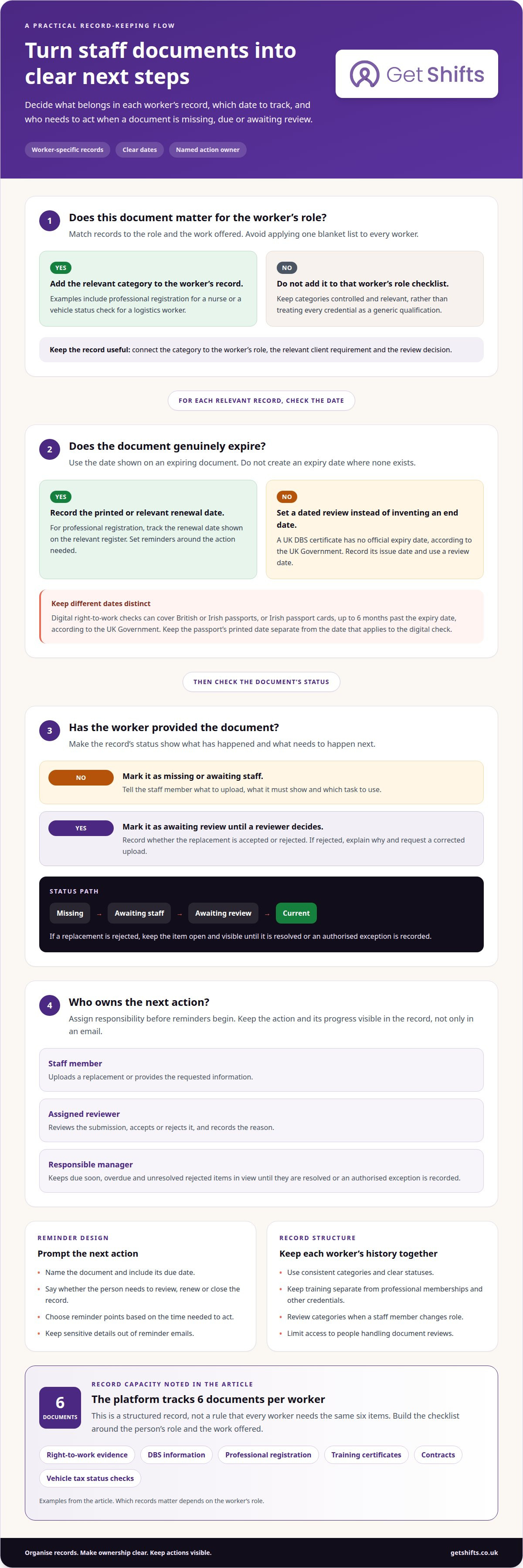
Start with the document category, then link the upload and its relevant date to the correct staff member. A clear record shows what is current, what needs review and who must act next.
For each upload, record the document type, the date shown and the action required. For example, put a professional registration record in its own category and enter the renewal date shown on the register. If a record has no expiry date, use a dated review instead.
A DBS certificate has no official expiry date, according to the UK Government. Record its issue date and use it when deciding whether to request a newer check. For professional registration, track the relevant register’s renewal date so the record prompts a specific follow-up action.
Digital right-to-work checks can cover British or Irish passports, or Irish passport cards, up to 6 months past the expiry date, according to the UK Government. Keep the passport’s printed date distinct from the date that applies to the digital check.
Tell staff exactly what to upload: name the document, explain what it must show and direct them to the relevant task. A reminder email should identify the item, its due date and the next step. If the person doesn’t respond, keep the overdue item visible to the responsible manager and update its status until it is resolved or an authorised exception is recorded.
Centralise records by staff member instead of scattering uploads across inboxes and folders. Use consistent statuses such as missing, awaiting staff, awaiting review, current and expired. This gives reviewers a shared view of outstanding actions.
Protect personal information by limiting access to people who review documents, and keep sensitive details out of reminder emails. Record whether a replacement is accepted or rejected. If it is rejected, explain why and request a corrected upload, so the staff member can act without another round of chasing.
How do expiry notifications work?
Automated alerts can turn recorded expiry dates into actions, rather than leaving managers to scan files. Set each alert around the next step, whether that is requesting a replacement, reviewing a submission or confirming a dated check. For a contract, use its recorded end date. State whether the action is to review, renew or close the record.
Make each reminder useful: name the document, include its due date and state what action is needed. Direct the staff member to the relevant task, such as uploading a replacement. A clear message helps them respond without searching old emails or asking which document needs attention.
Choose notification points based on how much time people need to act. A renewal may need an earlier prompt than a routine review if the staff member must arrange a replacement. Avoid sending every routine reminder to every manager. Focus manager notifications on items due soon, overdue items and unresolved rejections.
Track progress through the item’s status, not just an email record. Distinguish between a reminder sent, a document uploaded, a submission awaiting review and a rejected replacement. Keep overdue items visible to the staff member and responsible manager until resolved or an authorised exception is recorded.
Assign an owner to each action before alerts begin. The staff member may upload a replacement, while an assigned reviewer accepts or rejects it and records a reason. If a rejection needs correction, send the request back to the staff member and keep the item open. A document expiry tracking workflow keeps these steps together.
Centralised staff document and credential records
Keep each worker’s records in a consistent structure, with a clear owner for updates and reviews. A useful record can connect the document category, worker’s role, relevant client requirement and review decision. This context helps managers understand why a document is held, rather than seeing an attachment without its purpose.
Set access and retention rules for document records. Keep earlier versions and decision history according to your organisation’s retention rules, and restrict access to people handling compliance reviews. A reviewer may need a previous training certificate to understand a decision, while a rota co-ordinator may only need the current status. Clear permissions limit unnecessary exposure of personal information.
Use a controlled list of categories across the workforce, then map each category to the roles where it applies. A nurse’s professional registration and a logistics worker’s driving credential serve different checks, so avoid treating either as a generic qualification. A controlled category list can also point reviewers to the Disclosure and Barring Service’s official information when they need to identify the DBS record type being logged.
When a staff member changes role, review their document categories and update the record set. Keep training records separate from professional memberships and other credentials, so reviewers can find evidence relevant to a placement. To track staff document expiry as roles change, make the worker’s record the reliable reference point, with clear ownership and a visible decision history.
Documents tracked for each worker
In the UK, track documents and credentials relevant to each worker’s role instead of applying one blanket list. Examples include right-to-work evidence, DBS information, professional registration, training certificates, contracts and vehicle tax status checks.
The platform tracks 6 documents per worker. Treat that as a structured record, not a rule that every worker needs the same six items. A nurse’s professional registration may matter for a shift, while a logistics worker may need a vehicle status check. Match requirements to the role and the work offered.
Build a worker-specific checklist around the evidence your agency needs to review. For each item, record its purpose, required version and whether an attachment is needed. Distinguish a certificate upload from a confirmation or dated status check. This makes clear what the worker must provide and what the reviewer must assess.
- Identity and permission: record the relevant right-to-work evidence and its applicable dates.
- Checks and credentials: separate DBS information from professional registration records.
- Role preparation: group training certificates by the work they support.
- Other records: track contracts or vehicle status checks where relevant to the role.
Keep each replacement as a new version linked to the same worker and requirement. A manual list can help define categories, but someone must own it to keep dates and submissions current. Don’t treat every certificate as an expiry-based document; some records need a review date or issue date instead.
Use the checklist to show which records are required before a worker is considered for a particular shift. Keep the reason for each item clear, and limit access to people who handle document review. To organise these worker-specific records in one place, explore staff document compliance tools.
Get Shifts: Worker Compliance & Document Expiry Tracking
Get Shifts provides Worker Compliance & Document Expiry Tracking for staffing agencies that need to organise worker records and expiry dates alongside daily operations. The platform tracks documents by worker, helping your team see records and follow up on items that need attention. Staff Profile Documents for Clients lets you share relevant documents with care homes and other clients.
This can help when spreadsheets and inbox reminders make it difficult to keep workforce records current. Get Shifts provides software for staffing agencies, not temporary staff or document checks. Your agency decides which documents apply to workers and how your team reviews them.
To discuss document tracking for your agency, contact Get Shifts.
Build document control into your agency workflow
Reliable document control is about more than avoiding a last-minute scramble. It helps your team make clear, consistent decisions as workers move between roles, clients and shifts. Knowing how to track staff document expiry provides a starting point; the next step is making those checks part of your agency’s routine.
Consider how document oversight fits alongside your team’s other tasks. Get Shifts offers Staffing Agency Management Software, Shift Booking & Rota Management, and Open Shift Broadcasting to Eligible Workers. These tools support staffing operations from rota planning to communicating open shifts, while document tracking supports workforce administration. Assign clear ownership so everyone knows who handles each action.
To discuss how Get Shifts could support your agency’s document tracking and staffing workflow, contact Get Shifts. A considered process can make the next renewal easier to manage and give your team a clear route from record to action.
Frequently asked questions
Can staff upload their own replacement documents?
Yes. Workers can upload documents through the Worker Mobile App. Make each request specific: name the document and explain what the replacement must show. A reviewer can then record acceptance or rejection and give a reason if the file needs correction. This creates a clear handover from submission to review, rather than leaving the outcome buried in email.
Do DBS checks expire?
A DBS certificate has no official expiry date, according to the UK Government. It reflects information held when it was issued, so an agency may consider the issue date when deciding whether to request a newer check. With the person’s consent, an employer can check a standard or enhanced certificate through the DBS Update Service.
What does good expiry tracking require?
Effective tracking needs a named owner for each review, clear rules about which roles need each document, and statuses showing who must act next. For example, a rota co-ordinator should be able to distinguish a missing document from one awaiting review. Review the process when roles or client requirements change, so workers aren’t chased for irrelevant paperwork.
What goes wrong when nobody watches the dates?
A replacement request can be missed, or a manager may rely on an old version when making a booking decision. In a busy agency, this can mean avoidable chasing close to a shift and uncertainty about who reviewed the latest file. Clear ownership and an overdue queue help reveal stalled actions before they become a last-minute rota problem.
What should HR do when an employee’s certificate expires?
First identify the certificate and whether it has a genuine expiry date. Follow your organisation’s process for requesting and reviewing a replacement, then record the outcome against the correct worker. If the certificate relates to a booking requirement, apply the agency’s rules to decide whether the worker can be assigned while the record is unresolved. Keep the decision history clear.
When is a follow-up right to work check needed?
In the UK, a follow-up right-to-work check is needed before a worker’s time-limited permission to work ends. Record the permission end date and assign responsibility for the follow-up, rather than relying on someone to remember an email. Check current GOV.UK guidance for the applicable process and evidence, as the check route can depend on the worker’s circumstances.