How to Manage Open Shifts at a Temp Agency by Setting Clear Terms

Clear terms make open shifts easier to fill than a string of urgent calls. To manage open shifts at a temp agency, define the role, location, hours, pay, breaks and required skills before making an offer. Then contact suitable workers and confirm the details in writing.
When a client needs cover quickly, it’s tempting to focus only on availability. A clear brief, targeted contact and written confirmation help set expectations from the start.
Agency responsibilities before offering assignments
Before offering a UK assignment, define the client’s needs and assess whether each worker suits the role. A consistent process helps your agency respond to demand while keeping essential shift details in view.
Match workers to suitable shifts
Match each temporary shift to a worker’s skills, location and availability. For a nursing home, for example, consider relevant experience and travel distance alongside the client’s requirements. Availability alone does not make someone the right match.
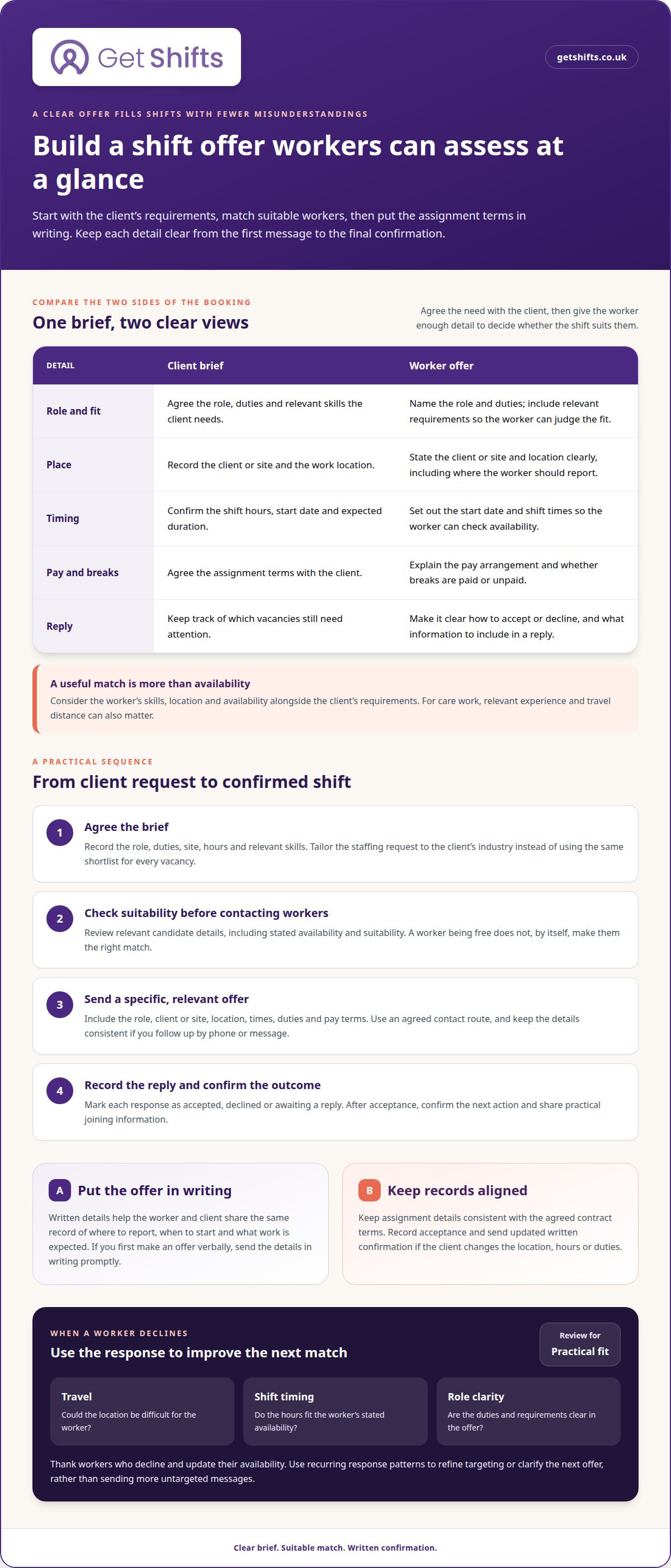
- Agree the brief with the client. Record the role, duties, site, hours and relevant skills. Tailor the staffing offer to the industry instead of using one shortlist for care, logistics and office work.
- Review candidate details before making contact. Check information relevant to the assignment, including stated availability and suitability. Organised registration records help you identify potential matches and take action when a client needs cover.
Contact workers about available shifts
Send a specific offer to workers who match the brief. Explain the role, location, hours and requirements so they can decide whether the shift suits them. Frame it as a relevant opportunity, not just an urgent request.
- Use a consistent process to send offers and record replies. Clear messages help workers respond and show co-ordinators which vacancies still need attention.
- Explain the assignment’s pay and basic working conditions. In the UK, agency workers are entitled to equal treatment on pay and basic working conditions after 12 weeks in the same role with the same hirer, according to the Department for Business and Trade.
There is no single typical fee for filling a temporary shift. Agency charges depend on the client agreement and factors such as the role, assignment length, worker pay and sourcing work.
To reduce unfilled shifts, target offers to workers whose skills, location and availability fit the brief. Clear terms help workers decide promptly and improve responses without repeated, untargeted messages.
Tailor offers to client needs, such as extra workers for large events or interim and seasonal labour for offices and retailers. State the rates and explain the role and requirements before negotiating a contract. A UK employment agency must provide a key information document as soon as someone applies to work with it. Some employment agencies need a licence when supplying workers to agriculture, food processing or other regulated sectors.
Assignment details and written confirmation
Clear written terms help workers decide whether an assignment suits them and give the client a shared record. Set out the details when making the offer, then confirm any agreed changes promptly.
- Record the assignment essentials. Include the client’s name, work location, role, duties, start date, shift times and expected duration. For example, a care home booking should identify the site and the type of work, not simply say “care shift”. Add any relevant skills or experience, so the worker can judge whether the opportunity fits.
- Put the offer in writing. In the UK, provide the assignment details in writing when making the offer. If you make the offer verbally first, send the details within 3 working days. A written record helps prevent misunderstandings about where to report, when to start and what work the client expects.
- Explain pay and conditions clearly. State the pay arrangement and describe the basic working conditions that apply to the assignment. Make clear whether breaks are paid or unpaid before the worker accepts. Don’t assume a worker knows the terms from a previous booking, even if the role and client are familiar.
- Keep the contract and assignment information aligned. Give the worker a written statement of employment particulars when they enter into a contract with the agency. Check that the assignment offer does not conflict with the agreed employment terms. A clear distinction between contract terms and details for a particular shift supports sound staffing and recruitment records.
- Confirm acceptance and changes. Record the worker’s response and send an updated written confirmation if the client changes the location, hours or duties. Keep the final version easy to find when coordinating the rota. Organised shift records can help keep booking details together as client demand changes.
Agencies should consider whether a worker is a suitable fit for an assignment before making an offer. Agencies should also check regularly with clients that temporary workers are meeting their needs, then use the feedback to guide future bookings and identify any support required.
Keep that amount distinct from the worker’s stated pay so the assignment terms remain clear.
How should agencies contact temporary workers about available shifts?
Contact workers with a clear, relevant offer that shows why the shift may suit them. A care worker, for example, needs a different message from a warehouse operative.
- Choose workers who fit the offer. Start with workers whose experience, location and availability suit the client’s request. Avoid sending every vacancy to the full candidate list. A targeted message helps each worker see why the opportunity may be relevant, rather than treating the offer as a generic call for cover.
- Make the message easy to act on. Include the role, client or site, location, shift times, duties and pay terms. For a hospital night shift, name the site and hours clearly. Give workers a simple way to accept or decline, and state what information you need in their reply.
- Frame the offer as a two-way opportunity. Explain what the client needs and how the shift could fit the worker’s stated preferences. Keep the tone direct and respectful. Don’t imply that a worker has accepted simply because they have read a text or spoken with a co-ordinator.
- Use a consistent contact route. Choose an agreed channel, such as a phone call, text or agency app, and keep the offer details consistent across messages. If you follow up by phone after a text, refer to the same shift. This avoids confusion when several client requests are active at once.
- Record replies and close the loop. Mark each response as accepted, declined or awaiting a reply. Once a worker accepts, confirm the next action and share any practical joining information. If they decline, thank them and update their availability rather than continuing to send reminders about that offer.
- Review response patterns before changing your approach. If workers often decline a particular offer, look for a practical mismatch, such as travel distance, shift timing or unclear duties. Adjust the targeting or clarify the details in the next message. This gives you a measured way to improve responses without sending more untargeted texts.
How can agencies match workers to shifts by skills, location and availability?
To decide how to manage open shifts at a temp agency, match each vacancy against the client’s requirements, then prioritise suitable workers by availability and practical travel distance. A consistent process helps you contact the strongest candidates first without treating proximity as proof of suitability.
- Turn the client’s request into matching criteria. Separate essential skills from preferences, then note the site, duties and shift times. A nursing home may need relevant care experience. A hospitality booking may depend on service experience and the venue. Clear criteria help co-ordinators compare candidates against the actual work.
- Compare worker experience with the role. Use current profile information to identify relevant skills and work history. Don’t rely on a job title alone. Two workers with similar titles may have different experience, so assess each person against the client’s duties before putting them forward.
- Check availability for the full shift. Confirm that the worker can cover the required start and finish times, not just part of the booking. For an early hospital shift, availability must include the start time and allow the worker to reach the site.
- Consider location alongside travel practicality. Compare the work address with the worker’s stated location and travel options. A nearby worker may still be unable to reach a site at the required time. Keep the address clear when a client has several locations.
- Apply the same criteria to each candidate. Record why a worker fits, including relevant experience, confirmed availability and a workable journey. This gives your team a clear basis for prioritising candidates and lets another co-ordinator continue the search if the first worker declines.
- Revisit matches when details change. If the client changes the hours or duties, assess the shortlist against the revised request. A worker who suited the original shift may no longer fit. Confirm current availability before making another offer.
When deciding how to manage open shifts at a temp agency, assess role fit first, then full-shift availability and practical travel distance. This gives co-ordinators a clear basis for prioritising workers as client demand changes.
Get Shifts: Open Shift Broadcasting to Eligible Workers
Get Shifts’ Open Shift Broadcasting to Eligible Workers helps staffing agencies share suitable vacancies without contacting every worker individually. Use it when a client needs shift cover and you want to reach workers who meet your eligibility criteria. Shift Templates & Repeat Patterns help keep recurring bookings consistent, while the Worker Mobile App lets workers view and accept shifts.
Clear terms still matter: include accurate shift information and apply your matching criteria before broadcasting. Get Shifts provides software for staffing agencies, not temporary staff. To organise open shift offers through staffing agency management software, contact Get Shifts.
Make open-shift coordination part of your daily workflow
The next step in how to manage open shifts at a temp agency is to make the process repeatable, even as client demand changes. A consistent workflow helps co-ordinators move from a new request to a clear offer without losing sight of worker suitability or client requirements.
Get Shifts offers Staffing Agency Management Software, Shift Booking & Rota Management, and Open Shift Broadcasting to Eligible Workers. These tools bring shift organisation and worker offers into your agency’s wider staffing workflow.
Consider where open shifts create the most admin for your team, then decide what you’d like to simplify first. Contact Get Shifts about open shifts to discuss how its software could fit your agency’s process and help you take the next step with confidence.
Frequently Asked Questions
How can temp agencies track and prioritise open shifts?
Track each vacancy by its status, client and required start time. A shared open-shift register shows co-ordinators which bookings still need workers, which offers are awaiting replies and which have been accepted. Prioritise shifts that need cover soon, then update the register after each response. This keeps handovers clear and reduces the risk of two co-ordinators chasing the same vacancy.
What software helps agencies manage and fill open shifts?
Staffing agency management software can bring shift booking, rota management and worker responses into one workflow. Get Shifts combines open shift broadcasting to eligible workers with shift booking and rota management. Workers can view and accept shifts in the mobile app, while co-ordinators follow bookings from open status through to confirmation. This brings updates together instead of scattering them across spreadsheets, calls and message threads.