Shift booking software for agency staff

A rota only works when the right staff can find and take the right shifts. For a UK staffing agency, shift booking software should organise bookings around workers’ availability, preferences and skills, with access through a mobile app and a browser.
When plans change, workers need a straightforward way to view suitable shifts and respond, while co-ordinators need a clear view of bookings. This guide explains what to look for and how mobile and browser access can support your agency’s rota process.
Key Takeaways
- Match each booking to workers’ availability, preferences and relevant skills to build a more suitable rota.
- Give staff a self-service way to view and book eligible shifts, while keeping booking decisions manageable for co-ordinators.
- Consider how shift bookings connect with the wider workforce management process, so key information is easier to coordinate.
- Choose mobile and browser access that fits how your staff and co-ordinators manage shifts throughout the working day.
Scheduling based on availability, preferences and skills
Effective rota planning starts with up-to-date availability, relevant skills and workers’ preferences. The software should make these details easy to use when assigning shifts.
Staff Scheduling and Rota Software
Staff scheduling software is a broad term for tools that organise shifts and working hours. Rota software focuses on arranging those shifts into a planned rota for a team, site or client. In agency work, look for a clear view of who is available, which skills a shift needs and where gaps remain.
A clear interface matters when co-ordinators are handling requests on a busy day. Check whether common tasks, such as filtering workers or opening a shift record, are easy to complete on a desktop or mobile device. Keyboard shortcuts can help frequent users, but essential actions should remain clear without them.
Reusable Employee Shift Templates
Reusable templates help when a client regularly needs a similar shift pattern. A manager can start with a saved structure, then adjust dates, times, location or staffing requirements before publishing the rota. This cuts repeated data entry without assuming every week will be identical.
Templates are most useful when managers can still account for availability, preferences and role requirements. A recurring care rota, for example, may need different staff on particular days even when the pattern is familiar. Review proposed assignments before confirming them, especially after workers update their availability or clients change their requests.
Rota Setup and Shift Request Approvals
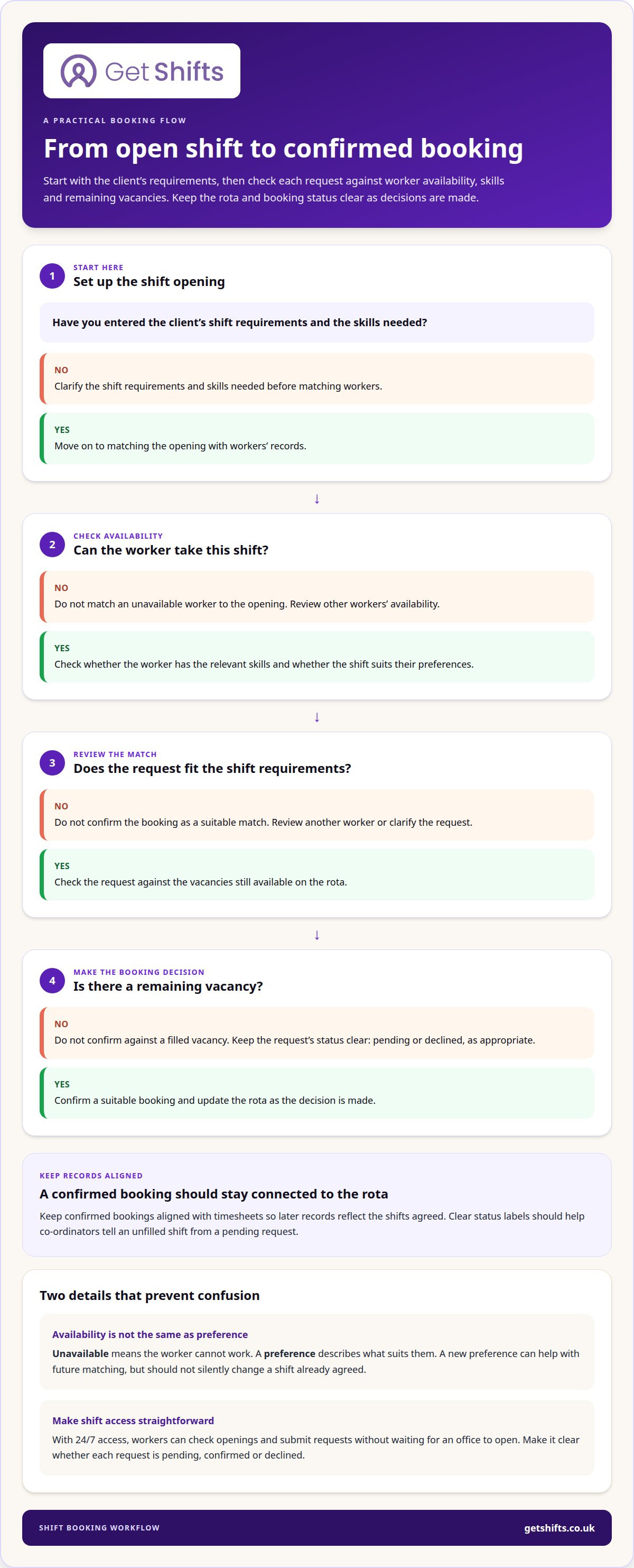
To set up a rota, enter the client’s shift requirements, specify the skills needed and match available workers to each opening. Then review requests against the remaining vacancies and confirm suitable bookings, keeping the rota current as decisions are made.
For open shifts, check whether the system can broadcast opportunities to eligible workers and show which requests still need a decision. Clear status labels help co-ordinators distinguish an unfilled shift from a pending request. Keep confirmed bookings aligned with timesheets so later records reflect the shifts agreed.
Availability and booking records may contain personal information. Risks include unauthorised account access, shared devices and exports stored or sent without appropriate care. Use individual accounts, limit access to relevant team members and handle downloaded files carefully. UK organisations should consult the ICO’s current data protection guidance.
Employee self-service and availability preferences
Self-service works best when workers can maintain information only they know, such as recurring availability, preferred locations or shift types. Define each field clearly: unavailable means they cannot work, while a preference describes what suits them. This helps managers assess requests without mistaking a preference for a firm restriction.
Set a routine for updating availability before planning a new rota. Workers should know where to record a change, and managers should know how to review it alongside existing bookings. A new evening preference, for example, may help with future matching but should not silently change a shift already agreed. Make clear to both sides when an update takes effect.
Access levels should match the actions each person needs to take. Workers may need to update their own details and view bookings; co-ordinators may need to manage agency-wide records. A client contact may have a narrower role, such as reviewing a booking or approving a timesheet. Define which actions belong to each role, then check that the software supports those boundaries.
Messaging and task handling can make follow-up easier to track. A co-ordinator might need to clarify a worker’s availability before offering a particular shift, or tell a team member that a request needs more information. Look for a way to keep the message connected to its relevant booking, rather than leaving the decision in an unrelated thread. An agency shift management system can bring these staff and rota tasks together, with access suited to each role.
Before adopting a new process, agree who updates availability, who reviews changes and how workers learn the outcome of a request. Clear working practices keep records useful as staffing needs change.
A good shift booking system should let staff book shifts at any time of day, providing 24/7 access. This can make it easier for workers on different schedules to check openings and submit requests without waiting for an office to open. Keep the route straightforward, and explain how staff can see whether a request is pending, confirmed or declined. Clear status information helps workers plan around the shifts they have actually secured.
What is a Shift Booking System?
A shift booking system brings shift requirements, bookings and changes into one workflow. Its value depends on how well those records connect with the wider workforce management process.
Connected records help keep shift management, attendance and reporting consistent. A booked shift can inform timesheet checks, for example, while a change to a client’s request can prompt a rota review. Find out how information moves between systems, which records require manual entry, and whether reports clearly distinguish planned hours, recorded hours and overtime.
Availability, Leave and Time Off
Availability records show when workers can accept shifts; leave requests show when they are unavailable. Keep them separate so managers can tell whether a gap reflects a preference, approved time off or missing availability information.
For example, a restaurant worker’s evening availability may differ from their requested leave. A clear tracking process helps managers arrange cover without treating the records as interchangeable.
Holiday and Time-Off Management
Holiday management records requests, decisions and time away alongside planned shifts. Managers can compare a request with existing bookings and identify where cover may be needed before changing the rota.
Look for reports that make absence and booking information easy to review together. UK holiday entitlement depends on a person’s working arrangements; the GOV.UK holiday entitlement guidance explains the general rules.
Working Time and Holiday Rules
Scheduling software can keep shift, availability and leave records together for review as part of UK working-time and holiday processes. It does not determine whether an arrangement complies with the rules or replace an informed review of relevant guidance.
Use reports to spot patterns, such as repeated overtime bookings or shifts placed close together. Managers can then review the records against current UK guidance on maximum weekly working hours and holiday entitlement.
Task management can also support bookings. A co-ordinator can record a follow-up, such as confirming a client’s changed shift requirement, and track whether the rota and related records have been updated.
Some shift booking systems allow employees to request overtime shifts and record leave. Managers can review those entries alongside availability and planned shifts when considering cover.
Mobile and browser access
Mobile and browser access give workers and co-ordinators different ways to manage staffing tasks. A worker travelling to a care home can use a mobile app to view shift information, while a co-ordinator can review bookings in a browser. Check that each route supports the actions its users need.
For employee scheduling, mobile access makes it easier to view a shift or respond away from the office. Browser access can suit rota work that involves comparing bookings or reviewing a staffing grid. Consider how each screen displays shift details, client location and booking status. Clear information helps workers understand which shifts they have accepted.
Access should fit the working day, not just the office routine. A care worker may check a booking between visits, while a security co-ordinator manages cover from a workstation. Check whether staff can use the mobile app on their device and managers can complete rota tasks in a browser. The right balance depends on who does each task and where.
Updates need a clear path, too. When a shift changes, workers need to find the current details and managers need a consistent booking record. Avoid managing the same change through a phone call, text and separate spreadsheet. Decide which system holds the confirmed booking, then use that record when reviewing attendance or timesheets.
Consider what happens after the shift, too. If your process uses payroll exports, check how confirmed bookings and timesheet information feed into earnings records. The mobile view should be straightforward for workers, while browser access should help co-ordinators review wider records.
Compare both access routes against your actual workflow before choosing. Explore mobile app access for agency workers as part of that assessment.
Get Shifts: Staffing Agency Management Software
Get Shifts provides staffing agency management software for agencies coordinating client bookings and temporary workers. Its shift booking and rota management tools help you organise requirements, allocate staff and manage changes in one workflow.
When a shift remains open, you can broadcast it to eligible workers. Workers can use the mobile app to view shift information and respond, while your team manages bookings and rota activity. This suits agencies looking to bring shift coordination together instead of relying on spreadsheets, calls and scattered messages.
If your main challenge is managing agency bookings and rotas, explore how Get Shifts could fit your workflow. Contact Get Shifts to discuss your agency’s needs.
Make your next rota process easier to own
Choosing shift booking software also means deciding who keeps booking information current, resolves exceptions and communicates updates to the people affected. Agreeing those responsibilities before changing tools gives your team a clear starting point.
Map the hand-offs in a recent booking, from the client’s request to the worker’s confirmed shift and final record. Note where information changes hands, which decisions need a manager and what happens when plans change. This practical review can help you assess whether a new system fits how your agency works.
When you’re ready to discuss the operational fit, contact Get Shifts about your agency’s shift booking needs. A considered next step can help you move towards a clearer, more manageable process.
Frequently Asked Questions
What features should UK businesses look for in shift booking software?
For agency work, consider whether the system applies booking rules to shifts requiring specific worker documents or qualifications. A warning can prompt a manager to review a booking; a block can prevent it proceeding under the configured rule. This distinction matters when clients or sectors have different booking conditions. Check how the system records the outcome for later review.
Which shift booking software is best for small businesses in the UK?
The right fit depends on the tasks your agency needs to bring together, not just its size. An agency handling frequent client changes may need a different workflow from one managing a stable rota. List the admin tasks you want to simplify, then assess whether a system supports them without adding unnecessary steps for workers or co-ordinators.
How do popular platforms compare?
Compare how each platform handles exceptions as well as routine bookings. Consider what happens when a worker cancels after accepting a shift or a client changes the requirement. Check whether the next action is clear, the right person can take it and the record shows what changed. These cases reveal practical differences between systems.