Staff compliance tracking software options compared by key features
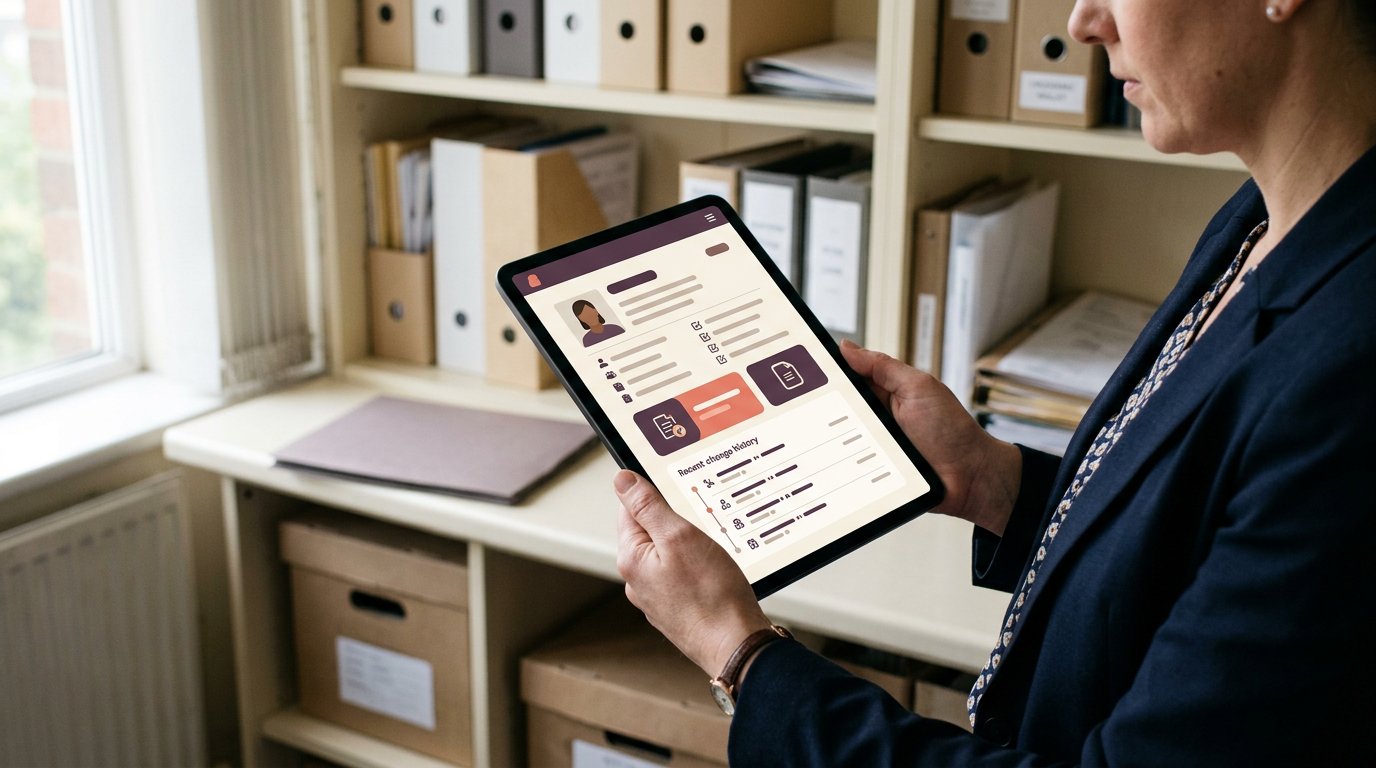
The most feature-packed option isn’t always the right fit for a staffing agency. Staff compliance tracking software varies in how it handles workflows, document monitoring, training records and incident reports. Focus on what gives your team a clear view of outstanding tasks without adding more administration.
If you manage temporary staff, you know how easily records, bookings and expiry dates can become disconnected across a busy rota. This comparison explains what to look for and how different approaches support day-to-day compliance.
Key Takeaways
- Compare tools by how they record changes, organise access and make evidence easier to find.
- Look for workflows that help assign compliance tasks and keep updates visible as requirements change.
- Assess how monitoring brings together current records and supporting evidence, rather than relying on occasional manual checks.
- Consider how training records and incident reports fit into your staffing processes when choosing software.
What is compliance management software?
Compliance management software organises staff documents, records and oversight in one system. For UK staffing agencies, the right choice depends on how you review evidence, manage access and prepare reports.
Compliance Documentation and Audit Records
Documentation tools store staff records and help you trace changes, such as when a document is added, reviewed or replaced. Dashboards serve a different purpose: records hold the evidence, while dashboards summarise its status. For agency workflows, check whether you can find a staff member’s current document and its history without searching separate files.
Staff compliance tracking software should make the record trail clear to authorised users, not just collect files.
Dashboards and Compliance Reports
Dashboards bring key compliance information together, while reports let you review or share a defined view. Unlike recordkeeping, they highlight patterns or outstanding items rather than hold the underlying evidence. Check whether reports can show useful views, such as records by staff member, document type or status.
The right option for a UK business depends on its workflows and reporting needs. Compare ease of use by checking how quickly users can find a record and understand its status.
Access Controls and Audit Trails
Access controls determine which users can view or change records. Audit trails log actions, helping you distinguish a current document from an earlier version and see who changed a record. These features support internal oversight in different ways: permissions limit access, while trails show activity.
Consider privacy risks when handling staff information. Look for role-based access and clear activity records, and assess how the system helps prevent unnecessary access.
Audit Readiness and Recordkeeping
Audit readiness means being able to assemble relevant records and explain their history without a last-minute search. Consistent naming, dates and status labels make records easier to retrieve. Staff compliance software may connect with HR, payroll, learning management or identity systems, but integrations vary by product.
Start implementation by mapping existing records, setting access roles and importing documents. Then test searches and reports. Costs depend on factors such as user numbers, required functions and setup; pricing is provided after a quote request.
| Option | Records | Reporting | Access and review |
|---|---|---|---|
| Spreadsheets | Manual files | Manual summaries | Managed by users |
| General compliance platform | Central record store | Compliance-focused views | Platform permissions |
| Staffing agency system | Staff-related records | Agency workflow views | Varies by system |
Choose by testing how each option handles your records, reports and access needs.
Compliance workflow automation
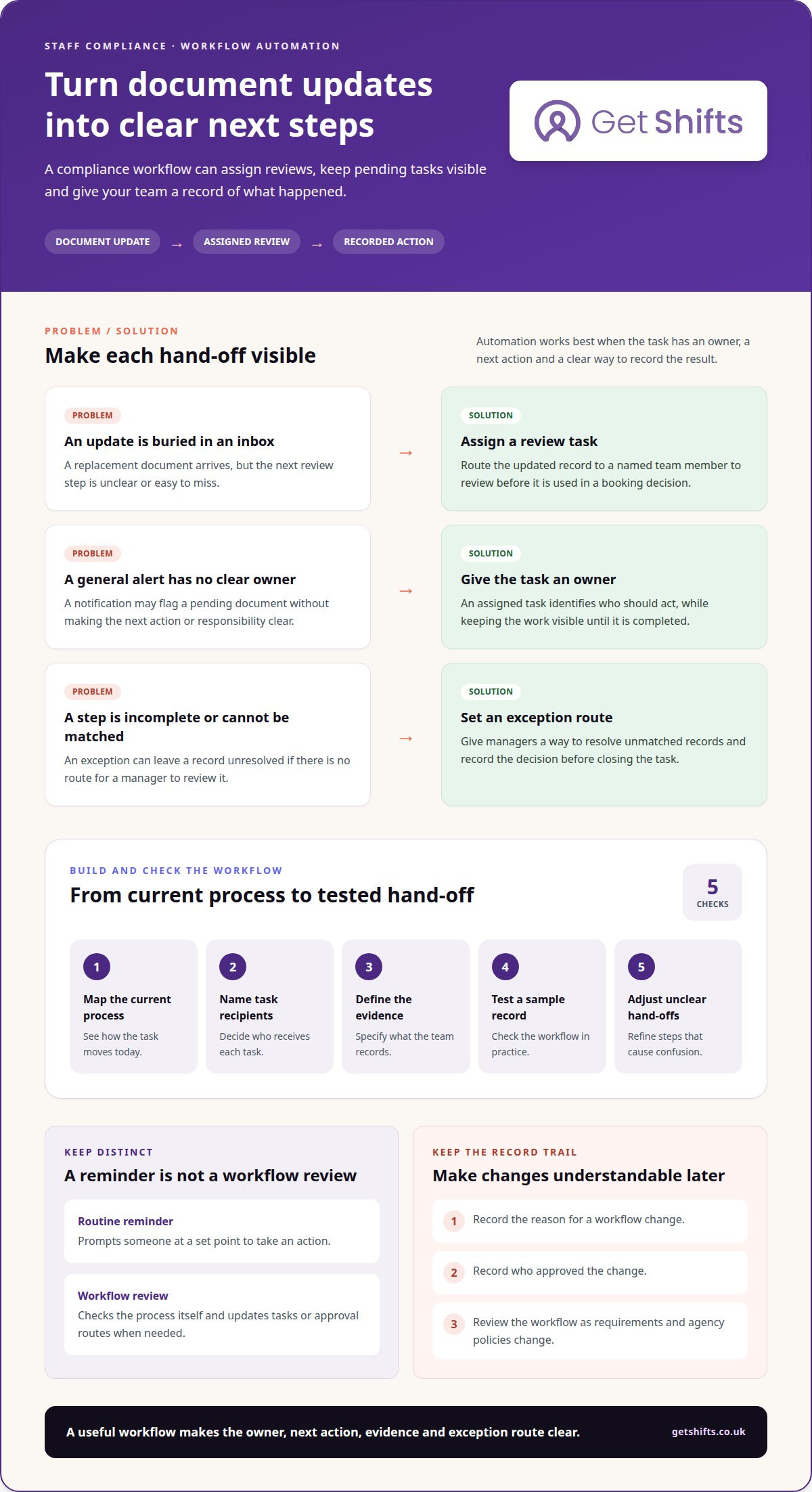
Automated workflows turn recurring compliance steps into assigned tasks, reminders and review points. For staffing agencies, this can link a document update to the checks needed before a worker is booked.
Workforce Document and Qualification Records
A workforce record brings together documents and qualification information associated with a staff member. A workflow can assign someone to review an updated record, rather than leaving the next action buried in an inbox. This differs from a policy workflow, which guides a team through a defined process instead of tracking an individual’s evidence.
For example, a document update can prompt a review task before the record is used in a booking decision.
Workflow Reviews as Regulations Change
Reviewing workflows means comparing each step with current regulations and policies, then updating the assigned tasks or approval route where needed. This is different from routine reminders: a review changes the process itself, not just the timing of a prompt. The UK Employment Rights Act 2025 is cited by UK Parliament as legislation introducing changes to employment rights.
Record the reason for each workflow change and who approved it. This gives managers a clear internal trail when a policy or process is revised. Review workflows regularly to keep instructions aligned with changing requirements, rather than relying on an outdated checklist.
Automated Reminders and Task Workflows
An automated workflow can assign an audit task and send a notification by email, SMS or push notification. For example, a reminder can prompt a named team member to review a pending document, then leave the task visible until someone completes it. Unlike a general alert, an assigned task has a clear owner and next action.
Map the current process before automating it: identify who receives each task, what evidence they record and what happens if a step remains incomplete. Test the workflow with a sample record, then adjust unclear hand-offs. Automation supports regulatory compliance, but the process still needs review as regulations and agency policies change. Include a route for managers to resolve exceptions, such as a document that cannot be matched to its staff record, and record the decision before closing the task.
What are compliance monitoring tools?
Compliance monitoring tools help you review whether staff records and processes remain up to date. For a UK staffing agency, they can bring document evidence, regulatory changes and internal performance measures into one management system.
Continuous Monitoring and Evidence Collection
Continuous monitoring means checking records as they change, rather than relying only on occasional reviews. For example, when a worker submits a replacement qualification document, the system can record the update and prompt a review.
Evidence collection focuses on what supports a record’s status, such as the document, its review history and any recorded action. A one-off audit, by contrast, checks a defined point in time. A comprehensive view helps you spot missing evidence and knowledge gaps, such as when a team member is unsure which record needs review.
Regulatory Compliance Monitoring
Regulatory compliance monitoring compares your processes and records with the requirements you have identified as relevant to your work. Unlike general record monitoring, it links evidence to a specific policy, regulation or internal control.
Regulatory change monitoring adds a review step when relevant guidance or rules change. Assign an owner to assess the change, identify affected document checks, then update the related workflow or policy. Record the decision and supporting evidence so managers can understand why a process changed and which records it affects.
KPI-Based Compliance Monitoring
KPI-based monitoring uses defined measures to show how compliance tasks are progressing. An agency might track outstanding document reviews, records awaiting approval or tasks completed by their due date. These indicators are not the evidence itself: a KPI points to a pattern, while underlying records explain individual cases.
Choose measures that lead to useful action. If a dashboard shows repeated delays in reviewing qualification records, managers can examine the hand-off and clarify ownership. Staff compliance tracking software is most useful when you can move from a measure to the evidence behind it, then decide which process needs attention.
Managing training records and incident reports
Training records and incident reports capture different parts of a staff member’s compliance history. A course record shows learning completed; an incident report documents an event, the response and any follow-up still needed.
Training Dashboards and Reporting
A training dashboard gives managers an overview of recorded learning by staff member, topic or completion status. Reports can help identify a missing record, such as a course entry with no certificate attached. The underlying record, unlike the dashboard, holds the details needed to understand what the staff member completed and when.
Use consistent course names and staff identifiers so records remain easy to review when a worker moves between client sites. A useful report should let a manager narrow the view by role or team, then locate the relevant record. Software can help organise training records, while course delivery and qualifications may sit outside its role.
Compliance Reporting and Version Control
Version control distinguishes a current document from an earlier one. If a staff member submits a replacement certificate, retain the record’s status and history so a manager can see which version supports a decision. Reports can highlight records needing review without replacing the evidence.
Tracking records across separate folders can make it harder to find the latest file. A consistent naming method, such as staff identifier plus document type, helps reduce confusion. Make the reason for replacing or correcting a record clear, especially if an earlier report has already been shared.
Real-Time Monitoring and Reporting
Real-time monitoring reflects recorded updates as they happen, while periodic reporting presents information at a chosen review point. For example, when a manager logs an incident, an open-actions view can help the team see what still needs follow-up.
Capture the incident date, relevant shift, people involved, action taken and remaining tasks. Use clear categories to separate events from training evidence, and restrict sensitive details to appropriate users. Review open reports at handover so responsibility for the next action is clear and unresolved matters do not get lost between shifts.
Get Shifts: Staffing Agency Management Software
Get Shifts provides staffing agency management software for agencies coordinating workers, candidates and client bookings. The platform brings these operational workflows together, helping you manage the process from candidate records to client requests. It is software for agencies, not a staff supply service.
The Worker Mobile App for iOS and Android lets workers use the agency’s platform. The Client Booking Portal supports client booking activity, while the Candidate Portal and Branded Job Board support candidate-facing processes. These tools are relevant when your main challenge is coordinating staffing operations alongside compliance processes.
If you’re reviewing how your agency manages its wider staffing workflows, contact Get Shifts to discuss whether the platform fits your needs.
Choose a clearer next step for your agency
Before changing systems, map one compliance process from the first record check to the booking decision. Note who needs the information, what action follows and where hand-offs slow down. This gives you a practical way to judge whether staff compliance tracking software fits the work your team actually does.
Get Shifts offers Staffing Agency Management Software, including Shift Booking & Rota Management and Open Shift Broadcasting to Eligible Workers. These tools support agency operations alongside compliance processes, helping you manage bookings and worker availability within the same broader workflow. The platform is designed for staffing agencies, not to supply staff directly.
Use your workflow as the starting point for a conversation about fit. Contact Get Shifts to discuss how your agency manages compliance and staffing operations, then decide on a next step that suits your team.
Frequently Asked Questions
What is a compliance system?
A compliance system combines the people, processes and records an organisation uses to manage its obligations. Software can support that system by organising information and making relevant tasks easier to review. For a staffing agency, it might sit alongside booking procedures and client requirements. Software supports administration; managers still decide which processes apply and how to handle exceptions.
Why is HR compliance important?
HR compliance helps an organisation manage its responsibilities towards staff and keep consistent records of decisions. For an agency, clear processes help teams handle worker information consistently across recruitment, bookings and changes to working arrangements. Good records also make it easier to understand why a decision was made. Software can organise information, but it cannot replace sound judgement or specialist advice.
What UK laws and regulations should staff compliance tracking cover, including GDPR and health and safety?
Relevant rules depend on your sector, the work and the information you handle. UK data protection involves the UK GDPR and Data Protection Act; the Information Commissioner’s Office guidance explains data protection responsibilities. For workplace safety, refer to current Health and Safety Executive guidance. Treat software as a way to organise records, not as legal advice or proof of compliance.
How can employers track training, certifications, licences and policy acknowledgements?
Use a consistent record for each staff member, with a document type, issue details, review status and any acknowledgement evidence. For example, keep a training certificate separate from a signed policy acknowledgement so each can be found for its purpose. Assign someone to review changes and correct incomplete entries. Tracking software can help organise these records, while training and qualification checks may require separate processes.
How can businesses measure compliance rates and generate audit-ready reports?
First define what counts as complete for the process being measured, then compare complete records with those due for review. Keep the reporting period and staff groups clear so readers understand what the measure represents. A report should let a manager trace a flagged item to its source record and action. Review exceptions separately: a headline rate alone cannot explain why a record is incomplete.
Which staff compliance tracking software platforms are best for UK businesses?
The right fit depends on your workflows and reporting needs. Compare how spreadsheets, general compliance platforms and staffing agency systems handle records, reports, access and reviews. Then test how quickly users can find and understand a record.