Temporary Staff Onboarding Software for Staffing Agencies

The paperwork before a first shift can be as demanding as filling the rota. Temporary staff onboarding software gives agencies a digital way to collect worker details, organise documents and track onboarding steps before a staff member is ready for a booking. It can bring scattered forms, email chains and manual chasing into a clearer process, showing what has been received and what still needs attention.
For UK care and nursing agencies, temporary staff onboarding software can bring onboarding tasks into the day-to-day process of coordinating workers and client bookings. This article explains how agencies manage registration and induction paperwork, which onboarding challenges software can address, and what to consider when choosing a process for temporary staff. It also covers how document tracking helps teams follow progress when workers complete forms between shifts. The focus is practical: clearer records, fewer loose ends and more time to organise cover.
Key Takeaways
- Map your onboarding steps across roles and workflows before choosing software, so the process fits how your agency actually operates.
- Use electronic signatures to make registration and induction documents easier to complete and keep track of.
- Compare subscription and one-off licensing models, and consider which costs matter for your agency’s needs.
- Review how onboarding tools fit with your existing systems, then consider whether Get Shifts’ staffing management software can support your rota and booking workflows.
What Is Temporary Recruitment Software?
Temporary recruitment software brings candidate records, onboarding checks, bookings and client updates into one platform. No single platform suits every UK agency. Compare options by how well they fit your roles, approval steps and client access, and how easily staff can complete and track tasks.
Complex onboarding workflows
Map each workflow before choosing software. A nursing candidate may need different documents and approvals from a hospitality worker, but both need a clear route from application to booking. Look for tools that organise steps by role, show who needs to act next and fit the systems your agency already uses. This makes duplicate data entry and error-prone hand-offs easier to identify.
UK recruitment compliance management
For UK recruitment agencies, compliance management means organising the evidence and checks relevant to each role, client and sector. Care and security bookings may involve different records, so a generic checklist can miss important distinctions. Specify which documents your agency tracks, who reviews them and how clients access relevant records. Keep procedures aligned with current guidance for your sector. Internationally, sector-specific bodies such as Fair Farms demonstrate how tailored HR support and certification standards can assist labour hire providers in maintaining workplace compliance.
Compliance tracking and candidate readiness
Document tracking should show what is on file, what needs review and what is approaching expiry. For example, a co-ordinator should be able to spot a document that needs attention before offering a worker a booking. Readiness rules can distinguish a complete profile from one with outstanding checks. Give care-home clients access to appropriate booking and compliance records so they can review information relevant to a requested shift.
Platform features and ease of use
Compare how software handles practical tasks, not just its feature count. Ask how a candidate uploads a document, how a co-ordinator spots an incomplete check and how a care-home client views a booking. Test those steps on a phone and computer. Clear labels, easy access to records and a useful overview help teams follow daily recruitment work. Check that the platform fits your workflow without adding unnecessary hand-offs.
Electronic signatures for registration and induction documents
Digital onboarding can help agencies organise temporary worker paperwork. Send registration and induction forms electronically, then track which steps are still outstanding.
Electronic signatures for onboarding documents
An electronic signature lets candidates sign digital registration or induction documents instead of printing and returning paper forms. Send each form with a clear purpose and completion step. For example, a care worker can review an agency policy and sign an acknowledgement on a phone. Keep signed documents with the candidate’s record so co-ordinators can find them without searching email threads. Explain the instructions clearly and give workers a way to ask about anything they don’t understand.
Automated document collection and verification
Use a consistent process to request and review documents, then follow up on missing items. A candidate can upload a required document through an online form, and the onboarding workflow can mark it as received. Receipt is not verification: a staff member still needs to review the document and record the outcome. Automated reminders can prompt candidates about incomplete forms or approaching expiry dates. Make each message clear about what to submit and where.
Centralised candidate document management
Store forms and supporting documents in one candidate profile rather than across inboxes, shared folders and paper files. Co-ordinators can then see which items are signed, awaiting review or need replacing. Clear labels help teams retrieve the right record when a client requests information relevant to a booking. A mobile-friendly process also lets workers complete paperwork between shifts. Limit access to people who need the records, and make the next required action easy to identify.
To connect candidate records with wider recruitment workflows, explore recruitment workflow options.
What are the Challenges staffing agencies face during the onboarding process?
Software can organise onboarding tasks, but it cannot replace staff judgement. Incorrect data, unsuitable workflows and workers needing help with digital forms are all potential challenges. For example, a signed document still needs review before an agency treats a check as complete.
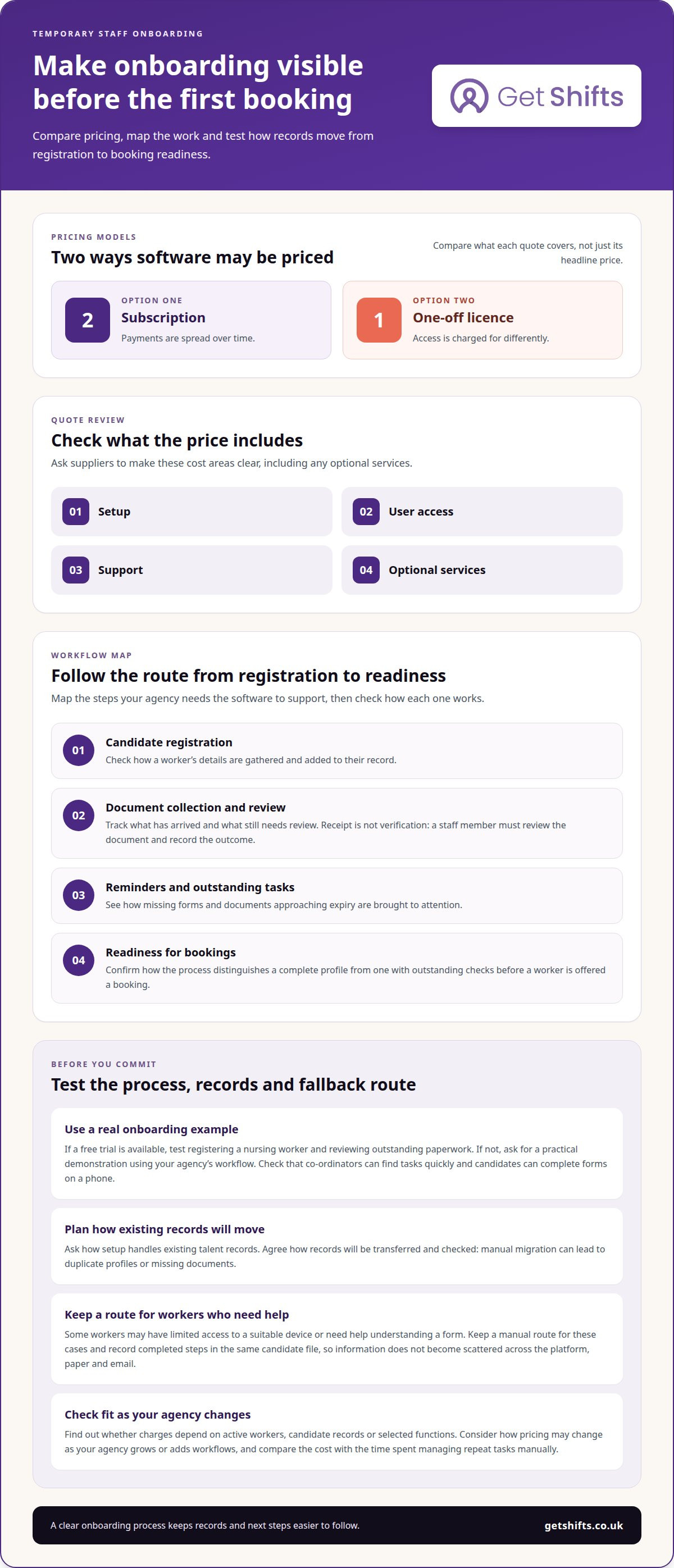
Costs also vary by pricing model. Temporary recruitment software may use a subscription or a one-off licence fee. A subscription spreads payments over time; a licence model charges for access differently. Compare what each quote covers, including setup, user access, support and any optional services. Avoid comparing headline prices alone.
Before signing a contract, list the workflows the software must support, including candidate registration, document collection and review, reminders, and readiness for bookings. Ask how setup handles existing talent records. Manual migration can lead to duplicate profiles or missing documents, so agree how records will be transferred and checked. A clear setup plan shows the time and staff input involved.
If a supplier offers a free trial, use it to test a real onboarding process, such as registering a nursing worker and reviewing outstanding paperwork. Check whether co-ordinators can find tasks quickly and candidates can complete forms on a phone. If a trial isn’t available, ask for a practical demonstration using your agency’s workflow.
Consider what happens when a candidate cannot use the digital process. A worker may have limited access to a suitable device or need help understanding a form. Keep a manual route for these cases and record completed steps in the same candidate file. This helps prevent information from becoming scattered across a platform, paper documents and email.
Finally, review how pricing changes as your agency grows or adds workflows. Find out whether charges depend on active workers, candidate records or selected functions. Match the pricing model to your expected use, then compare the cost with the time spent managing repeat tasks manually.
What is onboarding software?
Onboarding software organises the steps between a candidate’s registration and readiness for work. For a UK agency, its value depends in part on how well it connects with recruitment, HR and payroll processes.
Start by mapping where candidate information enters your agency. An applicant tracking system (ATS) holds recruitment records; an HR system may store staff details; payroll software uses information needed to process pay. If the same name, contact details or role must be entered separately in each system, ask whether the information can be transferred. Clear field mapping helps reduce repeated entry and mismatched records.
Integrations can work in different ways. A platform may connect directly to another system or provide a file for authorised staff to import. Ask what information moves, in which direction and when. For example, contact details may pass from an ATS, while approved hours may be exported for payroll. Don’t assume every record transfers automatically.
Payroll links need particular care. Confirm which fields transfer, who checks them and how corrections are handled. Onboarding software can support connected workflows, but it doesn’t replace payroll processing. Testing a sample worker record can reveal missing fields before your team relies on the connection. Reporting can also help identify incomplete records or steps that still require manual work.
Security and support matter during setup and daily use. Consider who can view candidate documents, how access is managed and what help is available if an integration fails. Agree who is responsible for resolving errors between systems. Clear ownership supports a smoother process and gives your team a practical way to restore accurate records.
To connect recruitment steps with wider agency workflows, explore recruitment workflow tools.
Get Shifts: Staffing Agency Management Software
Get Shifts brings staffing agency operations into one platform, helping you manage bookings and rotas alongside your worker network. When onboarding is part of a wider coordination challenge, connected shift workflows help teams move from worker availability to suitable cover.
Use Shift Booking & Rota Management to organise bookings, then broadcast open shifts to eligible workers. Workers can use the iOS and Android mobile app to view and accept shifts. This helps link staffing activity with the shifts clients need covered. Get Shifts provides software for agencies, not temporary staff supply or payroll processing.
If you want to discuss how the platform fits your agency’s workflows, contact Get Shifts.
Make your next onboarding change practical
Choose one part of your onboarding process to improve first. It might be a repeated hand-off, a delay between registration and booking, or uncertainty about who owns the next step. Map who handles the task, what information they need and where the process stalls. Starting with one specific issue makes it easier to judge whether a new approach fits your agency’s day-to-day work.
Choosing temporary staff onboarding software is also an opportunity to consider how onboarding fits into wider agency operations. Get Shifts offers Staffing Agency Management Software, including Shift Booking & Rota Management and Open Shift Broadcasting to Eligible Workers. These tools help agencies coordinate bookings and available workers alongside their onboarding process.
When you’re ready to discuss your agency’s workflows, contact Get Shifts about onboarding. A practical next step can make busy days easier to organise.
Frequently Asked Questions
How can an agency control access to staff records?
Use role-based access to set permissions according to each team member’s responsibilities. Recruiters may need candidate records, while administrators handle broader agency tasks. Get Shifts also supports two-factor authentication, Microsoft single sign-on and sign-in history. Give staff the access they need for their work without assigning every user the same permissions.
Can an agency import existing worker data?
Yes, Get Shifts provides staff data import and guided setup. This helps agencies bring existing records into a new system rather than creating every profile from scratch. Before transferring data, identify which records the team needs for ongoing work and who will review them after import. Clear ownership helps teams spot incomplete or duplicate profiles early.
Can candidates apply through an agency’s own online portal?
Yes, Get Shifts provides a candidate portal and branded job board. Agencies can use its recruitment and applicant tracking tools to manage applications, schedule interviews, record hiring decisions and collect references online. Applicants can engage with the agency’s recruitment process, while candidate activity stays within its recruitment workflow.
Can workers access the platform through a browser?
Yes, Get Shifts provides a worker web panel alongside its iOS and Android mobile app. Browser access can suit workers who prefer to use a computer to review information or complete online tasks. The mobile app is also available for workers. Both options support different working preferences.
Which temporary staff onboarding software platforms are best for UK businesses?
No single platform is best for every UK agency. Compare how well each fits your roles, approval steps, client access and existing systems, and whether candidates can complete and track tasks easily. Get Shifts is mentioned for staffing management workflows, but the material does not establish it as the best onboarding platform.
How do leading temporary staff onboarding tools compare on features and ease of use?
Compare practical tasks rather than feature counts: candidate document uploads, incomplete-check alerts, client access to booking records and document tracking. Test these steps on a phone and computer, and assess integrations, labels and how easily staff can find the next required action.