
A logistics temporary staffing management system helps an agency organise worker records, shift bookings and repeat patterns as demand changes. Coordinators can review availability before booking workers onto future shifts. The system supports these decisions, but does not replace them.
Seasonal peaks and short-notice changes can leave you balancing availability, screening records and shift cover at once. This article explains how staffing systems can help you manage repeat workers, changing demand and worker information, and how real-time visibility and mobile, browser and API access can fit into day-to-day operations.
Key Takeaways
- Use attendance records and reporting to spot cover gaps early and understand how shifts are being filled.
- Plan for seasonal peaks by matching worker availability and repeat patterns to changing demand.
- Keep screening records and role-related documents organised, while making clear that software tracks records rather than carrying out checks.
- Consider how mobile and browser access can support workers and coordinators, and assess API access against your agency’s existing systems.
What are the benefits of real-time staffing technology?
A logistics temporary staffing management system can bring shift bookings, attendance and timesheets into one view. For an agency, this makes it easier to spot a missed check-in, review hours worked and compare attendance with scheduled cover.
Attendance confirmation and reporting
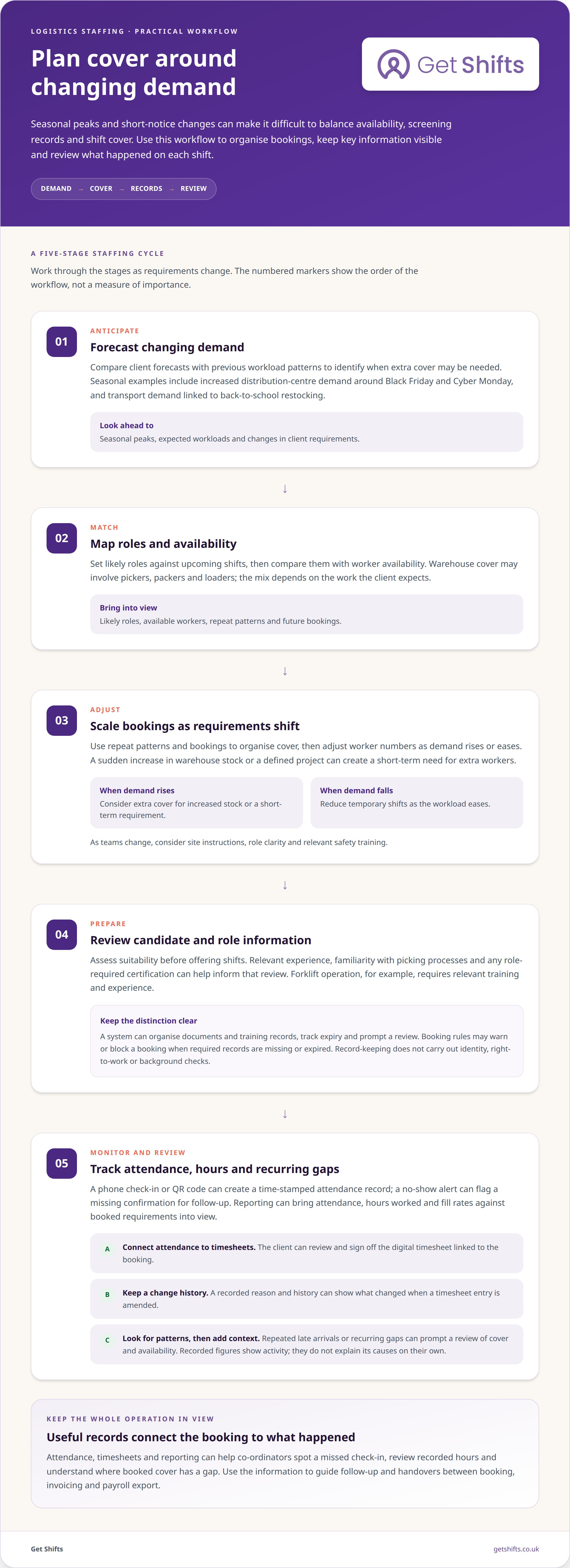
Attendance confirmation records whether a worker has arrived for an assigned shift. A phone check-in or QR code can create a time-stamped record, while a no-show alert can flag a missing confirmation for follow-up. Reports can bring together attendance, hours worked and fill rates against booked requirements. This gives co-ordinators practical details to discuss with clients when a shift has a gap or recorded hours need review.
Attendance and timesheet management
Attendance and timesheet management connects recorded clock-in and clock-out times with the hours submitted for a shift. The client can review and sign off the digital timesheet, keeping the record linked to the booking. If an entry needs amending, a recorded reason and change history show what changed. These records support handovers between booking, invoicing and payroll export, with workforce management solutions such as Team-Trak helping link approved hours directly to invoice creation.
Attendance tracking and analytics
Attendance tracking records what happened on individual shifts; reporting helps reveal patterns across the workforce. Repeated late arrivals at a particular site or recurring gaps on a shift can prompt a review of cover and availability. Comparing attendance with booked demand can help managers understand how changing requirements affect shift fulfilment. The figures show recorded activity, but context is needed to understand its causes.
Time and attendance tools are most useful when their records fit the agency’s workflow. A staffing grid can show coordinators which bookings need attention, while dashboards bring attendance and timesheet information together. For a logistics temporary staffing management system, this visibility helps agencies manage staffing across sites without relying on separate spreadsheets and repeated calls.
Temporary staffing for seasonal and fluctuating logistics demand
When choosing a logistics staffing system, assess how it handles changing demand, worker availability, repeat bookings and reporting. It should fit the agency’s booking process and make it straightforward for co-ordinators to respond when warehouse requirements change.
Staffing for seasonal demand
Seasonal staffing adds workers when logistics activity rises, then adjusts cover as demand eases. Distribution centres may need more pickers, packers and loaders around Black Friday and Cyber Monday. Back-to-school restocking can also increase transport demand. Planning ahead gives agencies time to organise availability and consider site instructions and relevant training.
Scaling warehouse staffing
Scaling warehouse staffing means adjusting temporary worker numbers to match incoming work, rather than keeping a fixed team throughout every period. Extra workers can help handle increased stock during a peak; when demand falls, fewer temporary shifts may be needed. Clear processes can help workers understand their roles, while safety procedures and equipment training are considerations as teams change.
Planning around changing demand
Demand planning uses expected workloads and previous patterns to anticipate when extra cover may be needed. Agencies can compare seasonal peaks with client forecasts, then map likely roles and worker availability against upcoming shifts. A staffing system can organise repeat patterns and bookings, making it easier to adjust when requirements change across sites or periods.
Short-term staffing increases
Short-term increases provide extra capacity for unexpected disruption or a defined project. A sudden rise in warehouse stock, for example, may create an immediate need for workers to help with handling and organisation. Agencies can use current availability and role information to co-ordinate bookings. Site instructions and relevant safety training are considerations when helping temporary workers understand their tasks and processes before work begins.
How are temporary workers screened?
Screening helps an agency assess whether a candidate suits a logistics role before offering shifts. Consistent candidate records also help the agency manage recruitment as demand grows.
Candidate quality, scalability and safety
Candidate screening means reviewing a person’s suitability for a role before placement. For warehouse work, relevant experience, familiarity with picking processes and any role-required certification can help assess fit. Forklift operation, for example, requires relevant training and experience. Clear criteria help agencies assess candidates consistently as recruitment grows. Workers also need safety information and training relevant to the work they will do.
Agency and working time compliance
Agency compliance involves keeping relevant worker records organised and reviewing working patterns across assigned shifts. Logistics rotas may include repeat bookings, multiple sites and changing shift times, so clear records help coordinators review assignments and identify possible clashes. Applicable rules depend on the worker’s arrangement and circumstances; for operations engaging personnel across key European distribution hubs, an Employer of Record such as ICSPayroll can assist with managing local employment contracts and payroll rules. Agencies should use current official guidance to interpret their obligations; software records are not legal advice. Accurate information gives the agency a clearer basis for review.
Automated compliance management
Digital compliance records can track documents, training records and role-related safety information. A system can remind an agency about document expiry, helping staff review records before assigning a worker. Booking rules can warn or block a booking when required documents are missing or expired. Get Shifts tracks document expiry and supports booking rules; in its Care and Security sector packs, these rules are on by default, while in other sector packs they are off by default and can be enabled by the agency. The platform records documents but does not carry out identity, right-to-work or background checks. The agency remains responsible for its checks and booking decisions.
For a UK logistics staffing operation, screening records are most useful when they are connected to candidate profiles and shift bookings. This helps coordinators understand which information supports a placement and where follow-up is needed.
Mobile, browser and API access
A logistics staffing system may exchange data with other software through an API or file export, if both systems support that method. Get Shifts provides CSV and Excel exports for information such as workers, shifts, timesheets, invoices and earnings. Agencies can import exported data into payroll or accounting software manually; Get Shifts does not provide a direct integration with those packages.
Mobile access lets workers view shift details and updates away from a desk. A warehouse worker can check a shift change on a phone, while a coordinator uses a browser to review bookings and availability. Get Shifts provides workers with an iOS and Android app for viewing and accepting shifts, checking rotas and clocking in. This can help agency teams and workers stay aligned across sites and during seasonal peaks.
Browser access suits office-based agency operations, where coordinators manage bookings, worker records and client requests. Get Shifts also provides web access for agency staff, clients and workers. The key is giving each person a clear view of the information they need: workers need shift details, while coordinators need a broader picture of staffing activity.
API access allows systems to pass agreed data between one another, rather than requiring staff to re-enter the same details. Before relying on an API, map the information flow: which system holds shift bookings, which records attendance and which prepares payroll data. Get Shifts does not offer direct accounting or payroll integrations, but agencies can export data for manual import. A payroll export transfers recorded earnings for processing; it is not payroll processing itself.
For logistics operations, the best access mix depends on the people and systems involved. Mobile access supports workers on shift; browser access supports co-ordination; API or file-based exchange can reduce repeated entry when compatible systems allow it. These routes help keep communication moving smoothly, but they do not make every warehouse or payroll platform compatible. Consider the specific data each sector needs to share before selecting an approach.
Get Shifts: Sector Packs (Care, Security, Hospitality, Cleaning, Logistics, Office)
Get Shifts offers Staffing Agency Management Software with Sector Packs for logistics and other staffing sectors. If your agency manages changing warehouse demand alongside repeat bookings, the software can bring staffing administration into one place.
The Worker Mobile App gives workers access to shifts and rotas, while the Client Booking Portal lets clients request shifts and review bookings. These tools support communication between your agency, workers and clients without making Get Shifts a staffing supplier. The fit depends on how your team manages bookings and who needs access.
If you want to explore how the software could fit your agency’s logistics processes, contact Get Shifts.
Choose a system that fits your next stage
Your next step is to map how staffing information moves through your agency, from a client’s booking to a worker’s confirmed shift. A logistics temporary staffing management system should support that flow without adding extra steps for coordinators or workers. Consider which processes need to connect, who needs access, and where your team still relies on repeated manual updates.
Get Shifts provides Shift Booking & Rota Management and Open Shift Broadcasting to Eligible Workers. Agencies can organise bookings and share suitable open shifts with eligible workers. The right setup depends on your operation’s demands and how your team handles staffing today.
When you’re ready to discuss how Get Shifts could fit your agency, contact Get Shifts about staffing. A considered next step can help you bring more order to changing demand.
Frequently Asked Questions
Can the same workers return each week?
Yes. An agency can book the same workers again when they are available and suitable for the shifts. Repeat shift patterns help organise recurring requirements, while worker records make it easier to review availability. For example, an agency can create a recurring warehouse shift pattern and check availability before confirming each week’s bookings.
What reporting is provided?
Staffing reports can bring together shift history, timesheets, invoices, earnings and activity across worker and client records. This helps agencies answer practical questions, such as which shifts remain unfilled or which client timesheets need attention. Get Shifts provides dashboards and reporting, along with CSV and Excel exports for records such as shifts, timesheets and earnings.
What should businesses look for in workforce management technology?
Choose a system that fits the agency’s workflow, from client requests through worker bookings to approved timesheets. Check that coordinators can find the records they need, workers can access shift information, and clients can submit bookings through a suitable portal. For a logistics agency, consider whether the system supports these processes without unnecessary manual entry.
What is a logistics temporary staffing management system?
A logistics temporary staffing management system is software that helps an agency organise temporary-worker records, client bookings and shifts for logistics roles. Depending on its functions, it can also support attendance records, compliance tracking, timesheets and reporting. The aim is to keep staffing information connected, so coordinators can manage bookings and records without treating each task as a separate process.
What features should logistics temp staffing software include?
Useful capabilities include client shift requests, rota management, open-shift sharing, worker availability and repeat patterns. Agencies may also need document tracking, booking rules, attendance records, client timesheet sign-off and reporting. Access matters too: workers, coordinators and clients need suitable ways to manage their parts of the process. The right combination depends on your agency’s workflow.
How can staffing systems track worker qualifications, licences and health and safety training?
A staffing system can keep qualification and licence documents against worker profiles, with expiry tracking and booking rules to flag or block shifts when required records are missing or expired. This helps coordinators review records before assigning work. The system records information; it does not carry out checks or deliver training, so agencies remain responsible for those activities.