An open shift is a planned block of work with a time, role and location, but no worker assigned. An open shift broadcasting app for temp workers lets an agency share the vacancy with eligible staff and collect their responses.
For care homes and hospitals, arranging cover means balancing speed with sending each opening to workers suited to the role.
This article explains how to publish shifts, manage responses and choose a process that keeps your rota clear as cover is confirmed.
Key Takeaways
- Separate unassigned open shifts from swaps, where a worker passes on a shift already on their rota.
- Choose between first-come claims for speed and manager approval when you need to review applications before confirming cover.
- Broadcast openings to workers who are eligible for the role, rather than relying on repeated calls and messages.
- Make each offer clear by including the shift times, location, required role or skill, claim deadline and relevant notes.
What is an open shift?
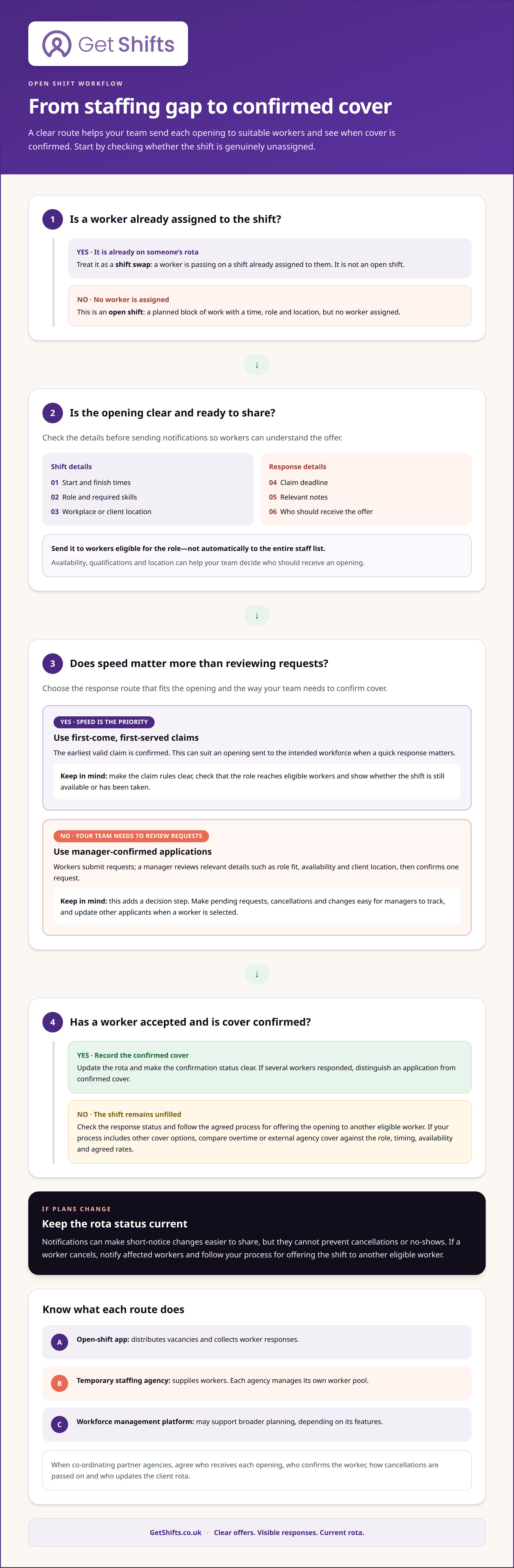
An open shift is a planned block of work with a time, role and location, but no worker assigned. Unlike a shift swap, which transfers a shift already on someone’s rota, an open shift starts unassigned. For example, a nursing home may need a qualified night worker at a particular site.
For a temp staffing team, a useful shift app should bring worker availability, rota changes, locations and notifications into a clear process. Managers can create a shift, add its start and finish times, role and workplace, then adjust the rota when cover changes. Across two care homes, naming each location helps workers see where they would be working. If you use another rota system, integration can reduce duplicate entry, where the systems support it.
Worker availability and qualifications help managers decide who should receive an opening. With Get Shifts, agencies can broadcast shifts to eligible workers, while compliance booking rules can warn or block bookings based on tracked documents. These tools support the agency’s own checks; they do not carry out right-to-work or background checks.
Open-shift notifications can make short-notice changes easier to share, but they cannot prevent cancellations or no-shows. Set a clear response deadline, monitor confirmation status and have a process for offering the shift to another eligible worker if someone cancels. Control access to worker information and handle personal data carefully. Working-time, pay and workplace matters can vary depending on the circumstances. Check current official guidance before assigning additional work.
Local rules and workplace policies can affect how you offer extra shifts, including notice, rest and record-keeping. In Great Britain, temporary staffing businesses are subject to the Employment Agencies Act 1973 and the Conduct of Employment Agencies and Employment Businesses Regulations 2003, according to the UK legislation register. A practical first step is to check the opening details, recipient group and approval process before sending notifications.
First-come, first-served and manager-confirmed applications
Open-shift notifications tell eligible workers that a role is available. They can then accept the shift or submit a request. A first-come process confirms the earliest valid claim, while manager approval leaves the final decision with your team.
First-come shift claims
Use first-come claims when speed matters and the opening is going to the intended workforce. The worker checks the shift details, including location and hours, before accepting it through the app. A clear status helps workers see whether the shift is still available or has been taken.
Before choosing this approach, consider demand and the role’s requirements. For example, a healthcare shift may require a particular qualification—such as sterile processing certification supported by Mbawine Consultant Services—so the opening should reach eligible workers rather than the entire staff list. Clear claim rules also help prevent duplicate responses when several workers view the same opening.
Manager approval for shift pick-ups
Manager approval suits shifts where your team needs to compare requests before confirming cover. A worker submits a request, then the manager reviews relevant details such as role fit, availability and client location. The manager accepts one request and updates the other applicants.
Approval adds a decision step but gives your team control over competing requests. When the rota is managed in the same system, confirmed cover can be reflected there without a separate update. Check how the workflow displays pending requests, cancellations and changes so managers can see each shift’s status.
Open-shift notifications
Notifications bring an available shift to workers’ attention through the channels the system supports. Include the role, location, start and finish times, and response deadline. For example, someone covering a hospitality shift needs enough detail to distinguish the venue and role from other openings.
Workers can use a mobile app to view shifts and manage requests without relying on a phone tree. Managers should be able to see whether a worker has applied or accepted, then update the rota when cover is confirmed. If demand changes, adjust the opening and notify affected workers so they are not relying on outdated details.
Broadcasting open shifts to temporary agency workers
Broadcasting helps an agency share suitable openings with its eligible workers. Clients may also co-ordinate cover with existing suppliers, but each agency remains responsible for managing its own worker pool.
Agency and overtime cost reduction
To manage cover costs, compare the available staffing options before confirming a shift. An agency can offer an opening to suitable registered workers first, then follow an agreed supplier process if it remains unfilled. Consider whether overtime or external agency cover fits the requirement. Broadcasting does not guarantee savings: the role, timing, availability and agreed rates all affect the decision.
Keep the process clear by recording which worker or supplier has confirmed and updating the rota when cover changes. This gives the team a more accurate view of any remaining gaps.
Comparing apps, agencies and platforms
An open-shift app distributes vacancies and collects worker responses; a temporary staffing agency or workforce solutions provider like Human Bees supplies workers directly. Workforce management platforms may support broader planning, depending on their features. These are different roles, not interchangeable services.
If a client co-ordinates partner agencies, agree who receives each opening, who confirms the worker and how updates reach the rota. For example, a hospital could send a nursing gap to its usual agency contacts, then record the confirmed supplier. This helps distinguish an application from confirmed cover.
UK apps for broadcasting shifts
Staffing agency software can broadcast openings to eligible workers within an agency’s own pool. Other workforce management platforms may also support open-shift offers, but the process varies by system. Identify whether the system serves internal workers, external agency pools or both.
For rota co-ordination across partner agencies, agree how shift details are shared and how acceptance is reported. Include the role, location, hours and required skills. Confirm who updates the client rota and how cancellations are passed on. These steps make cover status clearer across the agencies involved.
Publishing open shifts to eligible workers
Publishing an opening to eligible workers means choosing who can see it before sending it. Releasing shifts to internal workers before external pools gives your team a clear order for filling a gap.
Start with the client’s request, then create the opening with its start and end times, location, required role or skill, response deadline and relevant notes. For example, a care home’s night shift should name the home and role, rather than simply say “nurse needed”. Clear details help workers decide whether they can take the shift.
Next, select the audience. You could publish to an internal pool first, then open the shift to an external pool if it remains unfilled. Match eligibility to the role and workplace so the opening reaches suitable, available workers rather than every contact in your records.
- Set the shift details and response deadline.
- Choose the first eligible group to receive the opening.
- Review claims or applications and confirm the selected worker.
- Update the opening if the time, location or requirements change.
The order matters when a client prefers internal workers to have first access or an agency uses more than one worker pool. A staged release makes the process visible: managers can see whether the shift is awaiting responses, confirmed or still open. It also reduces confusion when several people respond to the same vacancy.
Publishing is not the final step. Once a worker is confirmed, update the rota and share the confirmed details with the client. On the day, attendance information helps the team see whether the planned cover arrived. If a worker cancels before the shift, reopen the vacancy or offer it to another eligible group.
A useful publishing feature supports the handover from selecting eligible workers to recording the outcome. Keep the audience, shift details and status current. This gives your team a reliable view of each opening, whether it is awaiting a response or needs attendance follow-up.
Decide how open shifts should move through your agency: who sees each vacancy, how workers respond and when cover is confirmed. A clear process helps coordinators manage changing demand while keeping the rota aligned with client bookings.
An open shift broadcasting app for temp workers can be part of that workflow. Get Shifts combines staffing agency management software with shift booking and rota management, including open-shift broadcasting to eligible workers. Your team can manage a shift from booking through to sharing it with the relevant worker pool.
If you’re reviewing how your current process handles unfilled shifts, consider what would make the next rota easier to manage. Contact Get Shifts to discuss how its software could fit your agency’s workflow.
Frequently Asked Questions
Is this useful for security companies needing last-minute guard cover?
Yes. Security teams can use shift-management software to circulate vacancies to eligible guards and keep cover status visible to coordinators. For an event post, the agency can organise openings by site and role, then track which worker is confirmed. Get Shifts helps agencies manage this process; it does not supply guards or replace the agency’s own checks.
What UK employment rules apply when offering shifts to temporary or agency workers?
In Great Britain, temporary staffing businesses are subject to the Employment Agencies Act 1973 and the Conduct of Employment Agencies and Employment Businesses Regulations 2003, according to the UK legislation register. Other applicable requirements depend on the work and circumstances. This is not legal advice; use current official guidance when considering a specific arrangement.
Can workers access shift details without using a mobile app?
Get Shifts provides a worker web panel alongside its mobile app. Workers can use a browser to view and accept shifts, giving agencies another way to share shift information with staff using a computer. Workers can also manage shifts on their phones through the app.