Recruitment Agency Applicant Tracking: Features and Checks

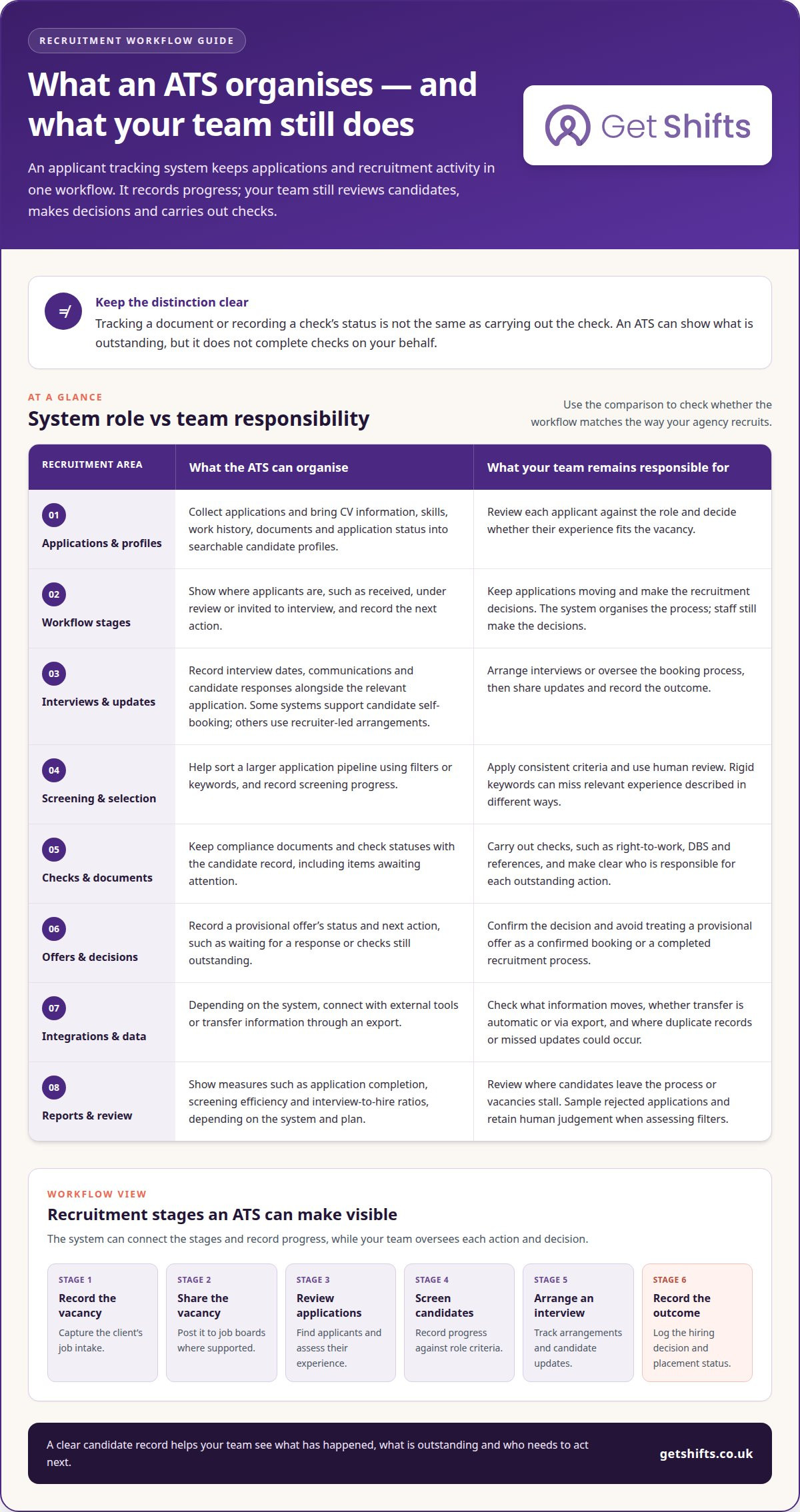
Candidate records, interview dates and compliance documents are hard to manage when they’re scattered across inboxes, spreadsheets and paper files. A recruitment agency applicant tracking system brings applications and recruitment activity into one organised workflow, so your team can see each candidate’s progress. It can support applications, interview scheduling and hiring decisions, but it doesn’t carry out checks on your behalf.
That distinction matters in temporary staffing, particularly when care homes and hospitals need suitable staff for shifts and clear records as bookings progress. An organised process makes it easier to see who reviewed an application, what decision was made and which documents still need attention.
This guide explains what an ATS does, how it fits a staffing agency’s recruitment workflow, and what to consider about cost and mobile access. It also explains where right-to-work, DBS and reference checks fit, including the difference between carrying out a check and recording its status. You’ll have a clearer basis for deciding whether an ATS suits your agency’s recruitment process.
Key Takeaways
- Use a central candidate record to keep applications, interview arrangements and communication easier to follow.
- Look at how recruitment tasks fit your agency’s workflow, from reviewing applicants to recording hire decisions.
- Weigh the system’s cost against the work it supports, and consider whether mobile access suits your team’s day-to-day needs.
- Separate tracking compliance documents from carrying out checks, so responsibilities and outstanding actions stay clear.
What is an Applicant Tracking System (ATS)?
A recruitment agency applicant tracking system organises applications and recruitment activity in a central candidate record. For an agency, it can connect a job-board application with profile review, interviews and communication. When choosing a recruitment agency applicant tracking system, consider how it supports each stage.
UK GDPR provides the data-protection framework for candidate records, and the ICO publishes guidance on handling personal data in employment. The guidance explains how data protection applies when organisations handle personal data during recruitment.
Application Collection and Candidate Profiles
An ATS collects applications and organises candidate details into searchable profiles. These can include CV information, skills, work history, documents and application status.
That gives recruiters one record to review when a care home needs a nurse or a hospitality client needs a worker. A profile also helps your team assess an applicant against the role, instead of searching separate inboxes for each CV.
Recruitment Workflows and Candidate Management
A recruitment workflow is the sequence of tasks that moves a candidate from application review towards a hiring decision. An ATS can organise applicants by stage, such as received, under review or invited to interview.
For example, a coordinator can find candidates who applied through a job board, review their experience and record the next action. Clear stages help your team manage the pipeline and spot applications needing attention, without assuming every applicant is ready for a shift.
Interview Scheduling and Candidate Communications
An ATS can help arrange interviews and keep candidate communications alongside the relevant application. Recruiters can record an interview date, share an update and track whether the candidate has responded.
This helps candidates understand their progress, including whether an application is under review or an interview has been arranged. Some systems let candidates book their own interviews; others support recruiter-led arrangements. Either way, recording updates can reduce uncertainty between application and decision.
Candidate Records and Provisional Job Offers
A candidate record brings application details, recruitment notes and decisions together. If an agency makes a provisional job offer, the record can show its status and next action, such as waiting for a response or outstanding checks.
This distinction matters: a provisional offer is not a confirmed booking or a completed recruitment process. Clear status records help coordinators avoid treating an offer as final when the candidate hasn’t accepted or required checks are outstanding.
ATS features and recruitment workflows
An ATS can organise hiring tasks from job intake to placement, with tools for applications, screening and reporting. Its value depends on how well those tools fit your agency’s workflow.
Applicant Tracking System Features
Applicant tracking system features help collect, review and progress applications. They can include job-posting distribution, candidate filtering, interview coordination and application updates.
For example, a recruiter filling a care shift can assess applications against the role’s requirements and record the next action. Keyword screening can help sort a large pipeline, but relevant experience may be described in different ways. Use consistent criteria and human review to keep screening decisions grounded in each applicant’s ability.
Workflows from Job Intake to Placement
An agency workflow links a client’s job intake to candidate selection and placement. An ATS can make each stage visible, from recording the vacancy and sharing it on job boards to reviewing applicants and recording a hiring decision.
For a nursing vacancy, the team can move a suitable candidate from screening to interview, then record the outcome and placement status. This makes progress visible across vacancies, instead of leaving each recruiter to track actions separately. The system organises the process; staff still make the decisions.
Integrations with Job Boards, Payroll and CRM Systems
Integrations connect an ATS with external tools, but availability depends on the specific systems and connections offered. There’s no standard list of UK job boards, payroll systems or customer relationship management (CRM) platforms that every ATS connects with.
Check whether a connection shares vacancy details, applicant records or placement information, and whether data moves automatically or through an export. For example, a payroll export may transfer approved worker details without creating a live connection. Understanding the data flow helps prevent duplicate records and missed updates.
Reporting and Workflow Limits
ATS reporting can show measures such as application completion, screening efficiency and interview-to-hire ratios. Comparing these over time can reveal where candidates leave the process or vacancies stall.
Plan features can determine which workflows or reports are available, so map the system against your actual hiring steps. Review job-board posting, screening, interview tracking and placement reporting. Filters have limits: rigid keywords can overlook relevant experience, so sample rejected applications and retain human judgement.
Choosing an ATS based on budget and mobile access
Recruitment agency ATS platforms differ in features, mobile access and ease of use. Compare how each handles your organisation’s entire recruitment process, from application review to reporting, rather than judging by a feature list alone.
Costs vary between basic systems and more advanced platforms. Make a like-for-like comparison covering the features your team needs, user access, setup, support and optional functions. Check what each plan includes, then consider whether tasks such as moving candidate details between tools still require manual work.
Mobile access matters when coordinators review applications away from a desk or arrange interviews between client calls. Test a real task on a phone: find a candidate, check their application progress and record an update. Clear screens and simple navigation can make the task quicker, while a crowded interface can slow it down.
Ease of use also depends on how closely the system fits your hiring workflow. Map your team’s steps, then compare how each platform handles vacancy details, screening, interview decisions and reporting. For example, check whether recruiters can find candidates by relevant skills without relying on one exact keyword.
Implementation needs attention too. Before transferring records, agree which candidate fields matter, who can access them and how your team will use each workflow. Test a vacancy from application to decision with the staff who’ll use the system. This can reveal missing steps before you move the entire recruitment process.
Use reporting to assess whether the new process improves the work that matters to your organisation. Compare application completion, screening activity and interview outcomes with your existing process, using consistent definitions. The strongest fit is a platform your team can use reliably within budget, without creating manual work elsewhere.
Right to Work, DBS and reference checks
An ATS can organise check records within the hiring process, but recording a check is different from carrying one out. For a care agency, separate records for right-to-work checks, DBS information and references can show what’s complete and what needs attention before a worker is considered for a placement.
According to the UK legislation register, UK employers must check that every worker has the right to work in the UK before employment starts under the Immigration, Asylum and Nationality Act 2006. The Home Office says UK employers can face civil penalties of up to £60,000 per illegal worker for failing to carry out appropriate right-to-work checks. These facts make a clear record of the check and its status important to the hiring process.
A DBS check is a background check, not something an ATS performs simply by holding candidate details. The system can organise related documents and show whether a record is pending or complete. The agency must still arrange the relevant check through its own process. Online reference collection can link requests and responses to a candidate record, making feedback easier to find.
Updates to pre-employment checks are useful when they show what changed and when. For example, a coordinator can update a status after receiving a reference, then identify outstanding items before progressing a candidate. Automated reminders and live updates depend on the system, so don’t assume every ATS provides them. A consistent structure helps staff distinguish received evidence from checks still in progress.
Document tracking supports administration; it does not establish that a check is valid or make a hiring decision. Explore worker compliance and document expiry tracking for a clearer view of records and outstanding actions.
Get Shifts: Recruitment & Applicant Tracking
Get Shifts offers Recruitment & Applicant Tracking for agencies that want to manage candidate recruitment alongside wider staffing operations. The feature sits within its Staffing Agency Management Software, bringing recruitment and day-to-day agency management into view.
For example, your team can use the Candidate Portal & Branded Job Board to support applications, then use the Worker Mobile App on iOS or Android as part of the worker experience. The Client Booking Portal lets care homes and other clients submit bookings. These tools suit agencies that want recruitment records and operations to work together rather than run as separate processes.
If you’re considering a more joined-up way to manage agency recruitment, contact Get Shifts.
Plan your next step from recruitment to rota
Choosing a recruitment agency applicant tracking system is an opportunity to consider how candidate records connect with your agency’s daily work. Think through the handover from recruitment decisions to the point when a client needs a shift filled. A clear process shows where information needs to move and who acts next.
Get Shifts offers Staffing Agency Management Software, including Shift Booking & Rota Management and Open Shift Broadcasting to Eligible Workers. These tools help agencies manage recruitment alongside the practical work of filling shifts, rather than treating each as a separate operation.
Consider how that connection could fit your agency’s current processes and the way your clients book staff. Contact Get Shifts to discuss the next step for your agency.
Frequently Asked Questions
How does ATS software improve efficiency?
An ATS can improve efficiency by reducing handover gaps, not just by saving clicks. If a coordinator finishes work with vacancies still open, a colleague can use the recorded owner and next action to pick up where they left off, without reconstructing the history from messages. Agree who updates each item; otherwise, the system can create the same confusion as an unmanaged spreadsheet.
How does an ATS help automate the hiring process?
Automation is most useful for predictable, repeatable steps with clear exceptions. For example, an agency could route incomplete applications for review while allowing complete submissions to move to the next stage. A recruiter still decides whether the information is suitable and what happens next. Set a human review point wherever an automated rule could delay or exclude a candidate.
How does an ATS work?
An ATS receives candidate information, links it to a vacancy and records activity as an application progresses. If someone applies for two roles, the team needs to distinguish each application from the person’s wider history. This helps prevent a decision on one vacancy being mistaken for the outcome of another, especially when roles have different requirements.
Is an ATS worth it for a small recruitment agency?
An ATS may suit a small agency if recruitment administration interrupts client work or several staff share candidate follow-up. A specialist handling a few vacancies with a stable applicant flow may find a simple process sufficient. Compare the time spent maintaining records with the effort of setup, training and updates. Workload and handovers matter more than agency size alone.
What are the key benefits of using an ATS?
A useful benefit is being able to review recruitment activity consistently across roles. Managers can check whether agreed criteria are being applied and where a process needs attention, rather than relying on informal recollections. For example, a review might show that one vacancy repeatedly stalls at the same decision point, prompting the team to clarify ownership or refine its process.